

Earlier this month, I wrote an article about PCoIP Technology which shows an Android application (VMWare View) running on an OMAP4 Tablet displaying a Windows 7 desktop. This remote desktop technology relies on a powerful server to do the processing and thin clients (in that case Tablets) to display the desktop. Since only pixels are transferred any OS (supported by the server) could be displayed in the thin client.
That made me wonder if there was an open source PCoIP client that could run on low end Linux client such as the Raspberry Pi. VMWare View Open Client provides just what we need, but is only available in source code so we need to cross-compile it for ARM or build it in an ARM machine. Today, I’ll show the instructions I followed to cross-compile it for ARM in Debian using Emdebian Toolchain.
First download and extract VMware View Open Client 4.5 source code:
|
1 2 3 |
wget http://vmware-view-open-client.googlecode.com/files/VMware-view-open-client-source-4.5.0-297975.tar.gz tar xzvf <code>VMware-view-open-client-source-4.5.0-297975.tar.gz cd VMware-view-open-client-source-4.5.0-297975 |
Install some tools on the build machine:
|
1 |
sudo apt-get install intltool |
and some ARM libraries and development packages:
sudo /usr/share/pdebuild-cross/xapt -a armel libicu-dev libcurl3-dev libgtk2.0-0 libboost-signals-dev
Finally, configure, build and install VMWare Open Client:
|
1 2 3 4 |
LDFLAGS="-L/usr/arm-linux-gnueabi/lib -lboost_signals" ./configure --target=arm-linux-gnueabi \ --host=arm-linux-gnueabi --prefix=/home/jaufranc/edev/vmware-client --with-boost-signals=no make make install |
That’s it! VMWare View for ARM is now ready. You just need to copy the files in the installation directory to your target board.
I have tried it in my Raspberry Pi emulator and after installation some libraries (libcurl3 and libboost-signals1.42.0), vmware-view could run (Screenshot below).
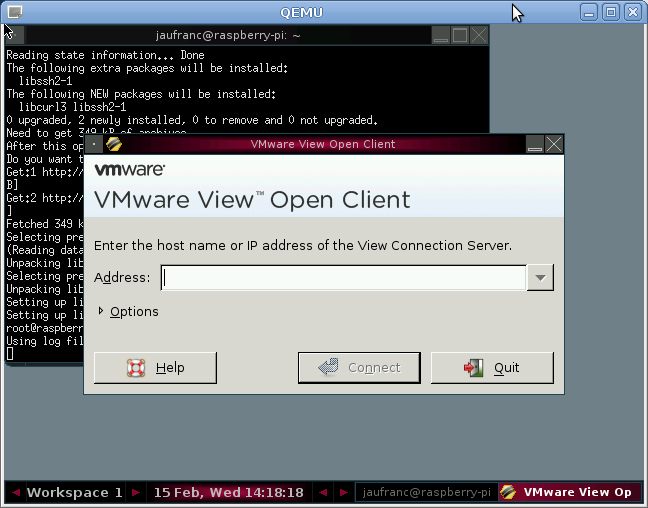
So we now have VMWare View (PCoIP client) running in an ARM emulator, we should then able to “run” any OS – such as Windows 8 – in the Raspberry Pi or other low-end thin clients. Of course, this method only makes sense if you need several thin clients with one server. I have not not fully tested this with a VMWare server, but I’ll surely have a try once the Raspberry Pi board and Windows 8 Consumer Preview are released later this month.

Jean-Luc started CNX Software in 2010 as a part-time endeavor, before quitting his job as a software engineering manager, and starting to write daily news, and reviews full time later in 2011.
Support CNX Software! Donate via cryptocurrencies, become a Patron on Patreon, or purchase goods on Amazon or Aliexpress


That sounds interesting.
I just found out about Raspberry pi and the first thing that came in to my mind was a pcoip client running on it.
Raspberry pi + some fullhd display + keyb + mouse would be a cheap alternative to Samsung NC240 pcoip display.
@ John U
Yes, the price and size of the Raspberry Pi open the door to all sort of applications that may not have been cost effective previously, although the total price of the Raspberry Pi is a bit higher than I expected (around 60 USD after shipping and taxes in the country I live).
I’m planning to try Windows 8 in Raspberry Pi via PCoIP once I get my board.
Hi!
It’s a very interesting subject that could be use on many products. In my case I tried so hard to cross-compil Vmware view to run on a Wyse T50, but I failed…
I hope that i will find a solution, I’m working on it…
Thanks for this instructions.
Let me know if you succeed, and if you don’t, you can always post your error message here (if any), maybe I’ll get an idea.
I’ve given up trying PCoIP for now, because the server setup seems relatively complicated and it apparently requires a paid version of VMWare vSphere.
Hi, working together with juli3n, (with your clever guidelines) and we both need a hand to setup cross-compiling platform (debian squeeze) :
checking for uidna_IDNToASCII in -licuuc… no : configure: error: libicu is required, but not found.
checked, libicu-dev & libicu-dev-armel-cross set up
Please help, you seem to know well how to set up perfectly squeeze ! is there any lack or newer package to set up ?
Thanks for your advices
@ Yann
If libicu-dev and libicu-dev-armel-cross are already installed, you’d better check config.log to see the exact error.
If by any chance, Wyse T50 is running a recent version of Ubuntu, you could also install vmware-view directly by running:
sudo apt-get install vmware-view-open-client
Of course, it exists but native PCOIP doesn’t work, only RDP (We get Remote KMS Container Error from View Server, on the other hand it works on windows thin clients). Well, here is the detailed error point : checking for uidna_IDNToASCII in -licuuc configure:10883: g++ -o conftest -g -O2 -DBUILT_BY_root -L/usr/arm-linux-gnueabi/lib conftest.cpp -licuuc -licudata >&5 /usr/bin/ld: skipping incompatible /usr/arm-linux-gnueabi/lib/libicuuc.so when searching for -licuuc /usr/bin/ld: skipping incompatible /usr/arm-linux-gnueabi/lib/libicuuc.a when searching for -licuuc /usr/bin/ld: skipping incompatible /usr/arm-linux-gnueabi/lib/libicudata.so when searching for -licudata /usr/bin/ld: skipping incompatible /usr/arm-linux-gnueabi/lib/libicudata.a when searching for -licudata /usr/bin/ld: skipping incompatible /usr/arm-linux-gnueabi/lib/libm.so when searching for -lm /usr/bin/ld: skipping incompatible /usr/arm-linux-gnueabi/lib/libc.so when… Read more »
@ Yann
It’s using g++ instead of arm-linux-gnueabi-g++
Have you install the toolchain following the instructions at http://www.cnx-software.com/2012/02/15/cross-compiling-vmware-view-for-arm-linux-in-debianubuntu/ ?
Can you verify arm-linux-gnueabi-g++ installed ?
If it is already installed, you may need to “export CXX=arm-linux-gnueabi-g++”
Hello,
I am trying to follow your ‘how to’ but when I try to run the ./configure command I get a message indicating that glib-2.0 and gmodule-2.0 are missing. Any tip on how to install them?
Thank you
@ Fernando
When packages are missing, you can find them with aptitude and install them with apt-get
http://www.cnx-software.com/2011/10/08/finding-a-missing-package-in-ubuntu-with-aptitude/
If aptitude is not installed on your system, simply run:
sudo apt-get install aptitude
Hello, I am trying to follow your HOWTO to porting VMware-view for ARM , But i got the problem when install Emdebian Toolchain , I run # apt-get install pdebuild-cross dpkg-cross and got the messages below. root@debian:/home/test/Desktop# apt-get install pdebuild-cross Reading package lists… Done Building dependency tree Reading state information… Done pdebuild-cross is already the newest version. You might want to run ‘apt-get -f install’ to correct these: The following packages have unmet dependencies: dpkg-cross : Depends: libdebian-dpkgcross-perl (= 2.5.8) but it is not installable libconfig-auto-perl : Depends: libconfig-inifiles-perl but it is not going to be installed Depends: libxml-simple-perl but… Read more »
@ morris
Try to run “apt-get -f install” to complete the installation.
hi , I am trying to Cross-compiling VMWare View for ARM Linux follow your howto. but i got the message when run LDFLAGS=”-L/usr/arm-linux-gnueabi/lib -lboost_signals” ./configure –target=arm-linux-gnueabi \ –host=arm-linux-gnueabi –prefix=/home/jaufranc/edev/vmware-client –with-boost-signals=no error massage as below . checking for C compiler default output file name… configure: error: C compiler cannot create executables see ‘config.log’ for more details. on config.log file , it seems missing -lboost_signals , message as below . Thread model: posix gcc version 4.4.5 (Debian 4.4.5-8) configure:3844: $? = 0 configure:3851: arm-linux-gnueabi-gcc -V >&5 arm-linux-gnueabi-gcc: ‘-V’ option must have argument configure:3854: $? = 1 configure:3877: checking for C compiler default… Read more »
@ cnxsoft
hello ,
tks, the embedian toolchain already installed.
hello ,
tks, the embedian toolchain already installed.
@ morris
I had a display problem and the line below did not show entirely:
sudo /usr/share/pdebuild-cross/xapt -a armel libicu-dev libcurl3-dev libgtk2.0-0 libboost-signals-dev
Try to run this again, before running the configure part.
cnxsoft :@ morris I had a display problem and the line below did not show entirely: sudo /usr/share/pdebuild-cross/xapt -a armel libicu-dev libcurl3-dev libgtk2.0-0 libboost-signals-devTry to run this again, before running the configure part. hi , thks your help , I had run sudo /usr/share/pdebuild-cross/xapt -a armel libicu-dev libcurl3-dev libgtk2.0-0 libboost-signals-dev but got warning message below ——————————————————————— After this operation, 333 MB of additional disk space will be used. WARNING: The following packages cannot be authenticated! libc-bin gcc-4.4-base libc6 libgcc1 libattr1 libacl1 libselinux1 coreutils libbz2-1.0 zlib1g liblzma2 xz-utils dpkg perl-base liblocale-gettext-perl libtext-iconv-perl libtext-charwidth-perl libtext-wrapi18n-perl debconf-i18n debconf libgdbm3 libslang2 libnewt0.52 libpopt0 libssl0.9.8… Read more »
@ morris
apt-get install failed.
try:
sudo /usr/share/pdebuild-cross/xapt -a armel libicu-dev libcurl3-dev libgtk2.0-0 libboost-signals-dev --force-yesthen make sure the cross libraries are installed before running ./configure
hello , thanks your help !
i got the new problem , when run
LDFLAGS=”-L/usr/arm-linux-gnueabi/lib -lboost_signals” ./configure –target=arm-linux-gnueabi \
–host=arm-linux-gnueabi –prefix=/home/jaufranc/edev/vmware-client –with-boost-signals=no
Result : checking for uidna_IDNToASCII in -licuuc… no
configure: error: libicu is required, but not found. Check config.log for details.
i had install libicu using ” apt-get install libicu-dev ” , but got the same error messages.
Any tips or hints? Thanks!
@ morris
As usual you need to check the config.log.
If uidna_IDNToASCII is really missing, then you need to cross-compile another version of libicu with the function, either a newer one or an older one.
cnxsoft :@ morris As usual you need to check the config.log. If uidna_IDNToASCII is really missing, then you need to cross-compile another version of libicu with the function, either a newer one or an older one. hi , i had installed another version of libicu but got the same error. i tried to trace the “configure” file, i discovered that the problem as below . script source code : fi ac_ext=cpp ac_cpp=’$CXXCPP $CPPFLAGS’ ac_compile=’$CXX -c $CXXFLAGS $CPPFLAGS conftest.$ac_ext >&5′ ac_link=’$CXX -o conftest$ac_exeext $CXXFLAGS $CPPFLAGS $LDFLAGS conftest.$ac_ext $LIBS >&5′ ac_compiler_gnu=$ac_cv_cxx_compiler_gnu cat >conftest.$ac_ext <>conftest.$ac_ext cat >>conftest.$ac_ext <<_ACEOF /* end confdefs.h. */ #include… Read more »
@ morris
I can’t see the error part in config.log. Maybe the best would be for you to provide me a link with your full config.log, or copy it in pastebin.com.
Thank you for this tutorial.
Could you please provide your mail address ?
@ morris
I can’t provide help by email (I usually delete those type of emails immediately), but I’m hjappy to help in the comment section.
I’ve seen your config.log. That’s the pb:
configure:10893: arm-linux-gnueabi-g++ -o conftest -g -O2 -DBUILT_BY_root -L/usr/arm-linux-gnueabi/lib -lboost_signals conftest.cpp -licuuc -licudata >&5
/usr/lib/gcc/arm-linux-gnueabi/4.4.5/../../../../arm-linux-gnueabi/bin/ld: cannot find -lstdc++
collect2: ld returned 1 exit status
You need to install ARM g++ toolchain or find out with it can’t find libstdc++.so
hi , thanks for your help .
i had through ./configure , make , make install , i copy the files to my target board , run ./vmware-view , i got error message below ,
~~~~~~~~~~~~~~~~~~~~~~~~~~~~~
/armvm/bin # ./vmware-view
./vmware-view: error while loading shared libraries: libboost_signals.so.1.42.0:
cannot open shared object file: No such file or directory
/armvm/bin #
~~~~~~~~~~~~~~~~~~~~~~~~~~~~~
How to install libcurl3 and libboost-signals1.42.0 on target board ?
i have no apt-get command on my target .
Any suggestion/hint is really appreciated.
@ morris
If you don’t have package manager on your board, you may have to cross-compile all dependencies (boost_signal, GTK, curL…).
What’s your board and Linux distribution ?
host : debian 6.0.3
Target : TI8168 EVM board
# uname -a
Linux (none) 2.6.37 #7 Mon May 28 18:07:13 CST 2012 armv7l GNU/Linux
@ morris
Yep, it seems they don’t have apt-get. I don’t know if it could be setup.
Some people appear to use opkg on TI8168 instead. I don’t know how to use it however.
Hi! While tried to compile this I got this errors: /usr/bin/ld: skipping incompatible /usr/arm-linux-gnueabi/lib/libboost_signals.so when searching for -lboost_signals /usr/bin/ld: skipping incompatible /usr/arm-linux-gnueabi/lib/libboost_signals.a when searching for -lboost_signals /usr/bin/ld: vmware_view-cdkUrl.o: Relocations in generic ELF (EM: 40) /usr/bin/ld: vmware_view-cdkUrl.o: Relocations in generic ELF (EM: 40) /usr/bin/ld: vmware_view-cdkUrl.o: Relocations in generic ELF (EM: 40) /usr/bin/ld: vmware_view-cdkUrl.o: Relocations in generic ELF (EM: 40) /usr/bin/ld: vmware_view-cdkUrl.o: Relocations in generic ELF (EM: 40) /usr/bin/ld: vmware_view-cdkUrl.o: Relocations in generic ELF (EM: 40) vmware_view-cdkUrl.o: could not read symbols: File in wrong format collect2: ld returned 1 exit status make[2]: *** [vmware-view] Error 1 make[2]: Leaving directory /root/VMware-view-open-client-source-4.5.0-297975' make[1]: ***… Read more »
@Alexander
Can you try to export LD variable to your arm-linux-gnueabi-ld binary? It seems to use the host ld binary.
So could this be applied to a chromebook with Debian installed?
@Asanga Jay
Sure you can basically do that with any Linux device with a display.
So, have you actually connected to a VMware View server that uses PCoIP exclusively?
All the research I’ve been able to do on this says that the open client does View over RDP only. I’m exploring this as an option here at my University, and we definitely need PCoIP support.
Also, have you tested this on actual Raspberry Pi hardware? (Either Rev A or B?)
@Chad Douglas
I did have a look at setting up PCOIP servers, but it seemed overly complicated, and as I understood it it requires a license, so I gave it up. I only tried in the emulator, but anything that works in the emulator should work just fine in the actual hardware.
hi。I am so sad!When I do : xapt -a armel libicu-dev libcurl3-dev libgtk2.0-0 libboost-signals-dev。
Package libicu-dev is not available, but is referred to by another package.
This may mean that the package is missing, has been obsoleted, or
is only available from another source
E: Unable to locate package armel
E: Package ‘libicu-dev’ has no installation candidate
others is the same!
please help me !thank you!
@w-tom
Things change quite fast in Linux world. At least in Ubuntu, xapt is not supported anymore, and instead people use multiarch: http://www.cnx-software.com/2012/05/02/getting-started-with-multiarch-armel-armhf-in-ubuntu/
hi。i am sorry。help me once more。thank you very much。
checking whether sys/ucontext.h defines REG_EAX… no
checking unicode/uidna.h usability… no
checking unicode/uidna.h presence… no
checking for unicode/uidna.h… no
configure: error: libicu is required, but not found. Check config.log for details.
why?thank you a lot。
@w-tom
“Check config.log for details.”
./configure –target=arm-linux-gnueabi –host=arm-linux-gnueabi –prefix=/home/user/edev/vmware-client –with-boost-signals=no
Result :
checking whether sys/ucontext.h defines REG_EAX… yes
checking unicode/uidna.h usability… yes
checking unicode/uidna.h presence… yes
checking for unicode/uidna.h… yes
checking for uidna_IDNToASCII in -licuuc… no configure: error: libicu is required, but not found. Check config.log for details.
why?thank you。
@Jean-Luc Aufranc (CNXSoft)
configure:10888: g++ -o conftest -g -O2 -I/usr/arm/include -DBUILT_BY_root -L/usr/arm/lib conftest.cpp -lsicuuc -lsicudata >&5
/usr/bin/ld: skipping incompatible /usr/arm/lib/libsicuuc.a when searching for -lsicuuc
/usr/bin/ld: cannot find -lsicuuc
/usr/bin/ld: skipping incompatible /usr/arm/lib/libsicudata.a when searching for -lsicudata
/usr/bin/ld: cannot find -lsicudata
collect2: ld returned 1 exit status
configure:10894: $? = 1
this is the config。log
LDFLAGS=”-L/usr/arm-linux-gnueabi/lib -lboost_signals”
why do you use -lboost_signals? sorry idont konw。can you tell me。thank you
and when i do make。i meet this question 。
Unknown EABI object attribute 44
/usr/local/arm/4.3.2/bin/../lib/gcc/arm-none-linux-gnueabi/4.3.2/../../../../arm-none-linux-gnueabi/bin/ld: warning: libz.so.1, needed by /chroot/natty_armel/usr/lib/libcurl.so, not found (try using -rpath or -rpath-link)
/usr/local/arm/4.3.2/bin/../lib/gcc/arm-none-linux-gnueabi/4.3.2/../../../../arm-none-linux-gnueabi/bin/ld: Warning: /chroot/natty_armel/usr/lib/libcurl.so: Unknown EABI object attribute 44
/usr/local/arm/4.3.2/bin/../lib/gcc/arm-none-linux-gnueabi/4.3.2/../../../../arm-none-linux-gnueabi/bin/ld: Warning: /chroot/natty_armel/usr/lib/libssl.a(ssl_lib.o): Unknown EABI object attribute 44
/usr/local/arm/4.3.2/bin/../lib/gcc/arm-none-linux-gnueabi/4.3.2/../../../../arm-none-linux-gnueabi/bin/ld: Warning: /chroot/natty_armel/usr/lib/libssl.a(ssl_cert.o): Unknown EABI object attribute 44
/usr/local/arm/4.3.2/bin/../lib/gcc/arm-none-linux-gnueabi/4.3.2/../../../../arm-none-linux-gnueabi/bin/ld: Warning: /chroot/natty_armel/usr/lib/libssl.a(ssl_sess.o): Unknown EABI object attribute 44
/usr/local/arm/4.3.2/bin/../lib/gcc/arm-none-linux-gnueabi/4.3.2/../../../../arm-none-linux-gnueabi/bin/ld: Warning: /chroot/natty_armel/usr/lib/libssl.a(ssl_ciph.o): Unknown EABI object attribute 44
/usr/local/arm/4.3.2/bin/../lib/gcc/arm-none-linux-gnueabi/4.3.2/../../../../arm-none-linux-gnueabi/bin/ld: Warning: /chroot/natty_armel/usr/lib/libssl.a(s3_pkt.o): Unknown EABI object attribute 44
vmware_view-baseApp.o: In function
cdk::BaseApp::IntegrateGLibLogging()':g_set_printerr_handler’/VMware-view-open-client-source-4.5.0-297975/baseApp.cc:110: undefined reference to
/VMware-view-open-client-source-4.5.0-297975/baseApp.cc:111: undefined reference to
g_log_set_default_handler'cdk::BaseXml::OnSslCtx(BasicHttpRequest*, void*, void*)’:vmware_view-baseXml.o: In function
/VMware-view-open-client-source-4.5.0-297975/baseXml.cc:1071: undefined reference to
g_module_open'g_module_symbol’/VMware-view-open-client-source-4.5.0-297975/baseXml.cc:1073: undefined reference to
/VMware-view-open-client-source-4.5.0-297975/baseXml.cc:1074: undefined reference to
g_module_close'cdk::BaseXml::GetChildContentUInt64(_xmlNode*, char const*)’:vmware_view-baseXml.o: In function
/VMware-view-open-client-source-4.5.0-297975/baseXml.cc:1454: undefined reference to
g_ascii_strtoull'cdk::BaseXml::Encode(std::basic_string<char, std::char_traits, std::allocator > const&)’:vmware_view-baseXml.o: In function
/VMware-view-open-client-source-4.5.0-297975/baseXml.cc:419: undefined reference to
xmlEncodeSpecialChars'xmlFree’/VMware-view-open-client-source-4.5.0-297975/baseXml.cc:422: undefined reference to
vmware_view-baseXml.o: In function
signal3':boost::signals::detail::signal_base::signal_base(boost::function2 const&, boost::any const&)’/chroot/natty_armel/usr/include/boost/signals/signal_template.hpp:197: undefined reference to
on Ubuntu 12.04 Error arm-linux-gnueabi-gcc -DPACKAGE_NAME=\”VMware-view-open-client\” -DPACKAGE_TARNAME=\”VMware-view-open-client-source\” -DPACKAGE_VERSION=\”4.5.0-297975\” -DPACKAGE_STRING=\”VMware-view-open-client\ 4.5.0-297975\” -DPACKAGE_BUGREPORT=\”http://code.google.com/p/vmware-view-open-client/issues/entry\” -DVIEW_GTK=1 -DVIEW_POSIX=1 -DPACKAGE=\”VMware-view-open-client-source\” -DVERSION=\”4.5.0-297975\” -DSTDC_HEADERS=1 -DHAVE_SYS_TYPES_H=1 -DHAVE_SYS_STAT_H=1 -DHAVE_STDLIB_H=1 -DHAVE_STRING_H=1 -DHAVE_MEMORY_H=1 -DHAVE_STRINGS_H=1 -DHAVE_INTTYPES_H=1 -DHAVE_STDINT_H=1 -DHAVE_UNISTD_H=1 -DHAVE_LOCALE_H=1 -DHAVE_LC_MESSAGES=1 -DHAVE_BIND_TEXTDOMAIN_CODESET=1 -DHAVE_GETTEXT=1 -DHAVE_DCGETTEXT=1 -DENABLE_NLS=1 -DHAVE_BOOST= -DPRODUCT_VIEW_CLIENT_NAME=\”VMware\ View\ Open\ Client\” -DVIEW_CLIENT_VERSION_NUMBER=\”4.5.0\” -DVMX86_TOOLS=1 -DVMX86_DEBUG=1 -DVMX86_DEVEL=1 -DVMX86_STATS=1 -DDEBUG_STUB_ACCESS_IO_PORTS=1 -DVMX86_LOG=1 -DDEBUG_STUB=1 -D_XOPEN_SOURCE=500 -D_BSD_SOURCE=1 -D_SVID_SOURCE=1 -D_LARGEFILE64_SOURCE=1 -D_FILE_OFFSET_BITS=64 -DHAVE_LSEEK=1 -DHAVE_UIDNA_IDNTOASCII=1 -DHAVE_DLFCN_H=1 -DHAVE_ARPA_INET_H=1 -DHAVE_LOCALTIME_R=1 -I. -I./lib/open-vm-tools/include -I./lib/bora/include -pthread -I/usr/include/gtk-2.0 -I/usr/lib/x86_64-linux-gnu/gtk-2.0/include -I/usr/include/atk-1.0 -I/usr/include/cairo -I/usr/include/gdk-pixbuf-2.0 -I/usr/include/pango-1.0 -I/usr/include/gio-unix-2.0/ -I/usr/include/glib-2.0 -I/usr/lib/x86_64-linux-gnu/glib-2.0/include -I/usr/include/pixman-1 -I/usr/include/freetype2 -I/usr/include/libpng12 -DGLIBC_VERSION_21 -DGLIBC_VERSION_22 -pthread -I/usr/include/glib-2.0 -I/usr/lib/x86_64-linux-gnu/glib-2.0/include -DBUILT_BY_user -g -O2 -MT lib/open-vm-tools/misc/libMisc_a-hashTable.o -MD -MP -MF lib/open-vm-tools/misc/.deps/libMisc_a-hashTable.Tpo -c -o lib/open-vm-tools/misc/libMisc_a-hashTable.o test -f 'lib/open-vm-tools/misc/hashTable.c' || echo './'lib/open-vm-tools/misc/hashTable.c /tmp/cc1Hc9Hu.s: Assembler messages: /tmp/cc1Hc9Hu.s:2137: Error: selected processor… Read more »
@Serge
The includes are pointing to some x86_64 header files. This could be the reason.
I’m not sure these are normal either: -DVMX86_TOOLS=1 -DVMX86_DEBUG=1 -DVMX86_DEVEL
Looks like your system may try to build for x86 using the arm gcc compiler.