Archive

Posts Tagged ‘3d printing’

PengPod 700 Linux Tablet Used As a 3D Printer Touchscreen Controller

April 6th, 2013 1 comment

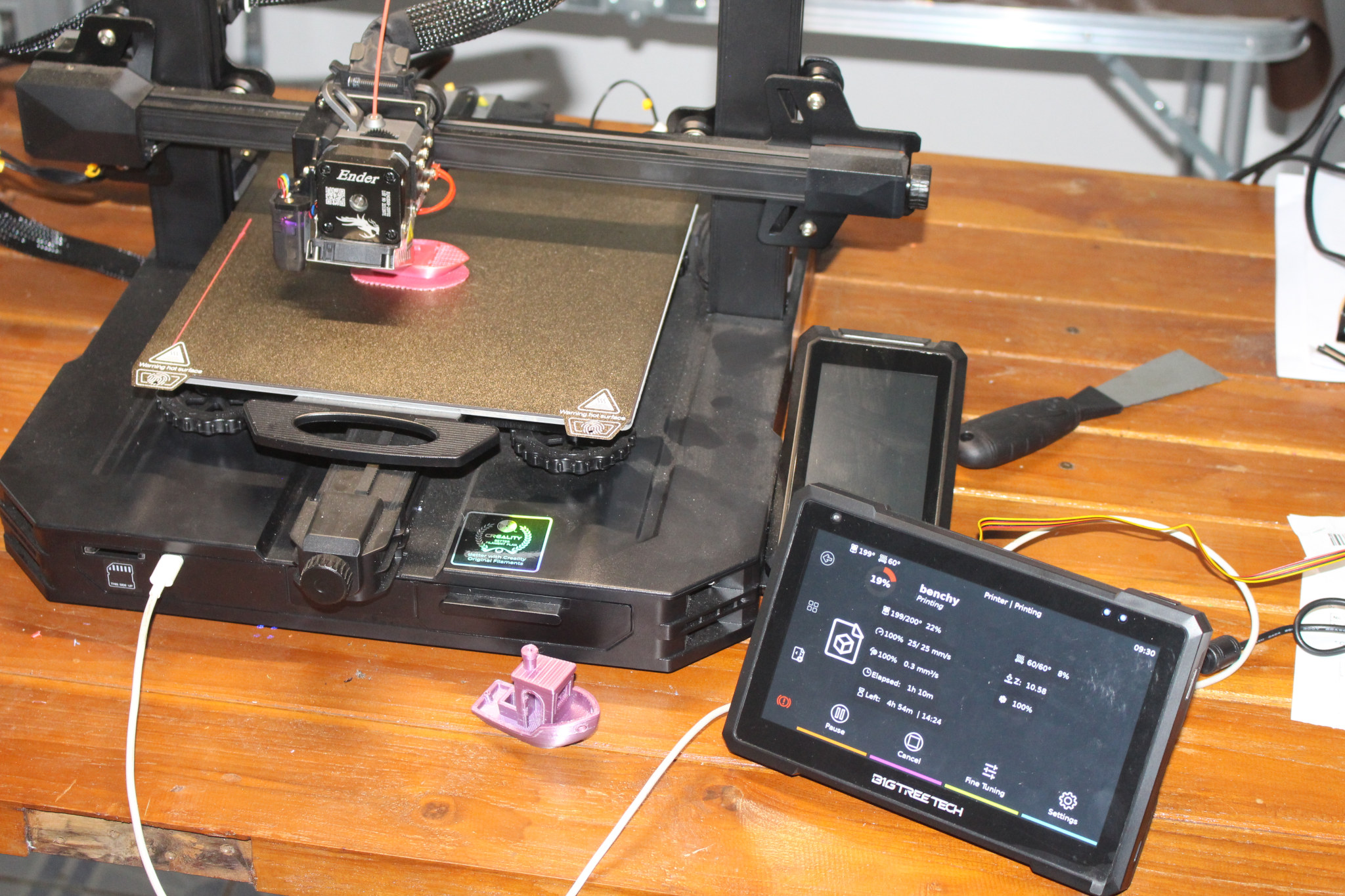
PengPod 700 & 1000 are two of the rare Linux tablets to be available on the market. Those tablets are based on AllWinner A10 SoC which can support both Android and Linux thanks to independent developers. After a successful Indiegogo campaign, where they managed to received pledges for a few hundred units of both model, people started to receive their Linux tablets earlier this year. Francesco Santini decided to purchase PengPod 700 in order to use it as an touchscreen controller for his 3D printer (Solidoodle).

Pengpod_3D_printer

He modified Pronterface, a graphical user interface written in Python to control 3D printer, for the 7″ display the of PengPod tablet, and made the change available in his github account https://github.com/fsantini/Printrun-pengpod700.

Pronterface

He uses a SAMBA share to copy G-code files (“G-code is the common name for the most widely used numerical control (NC) programming language”), and load the required file from the PengPod using the interface above.

He also created the holders to mount the tablet on the printer, as seen in the picture at the top, and uploaded the design files to http://www.thingiverse.com/thing:69593, which can be good if you need a stand for your tablet, whether you have a 3D printer or not.

You can find (or ask) more information on Soliforum.

Digg This
Reddit This
Stumble Now!
Buzz This
Vote on DZone
Share on Facebook
Bookmark this on Delicious
Kick It on DotNetKicks.com
Shout it
Share on LinkedIn
Bookmark this on Technorati
Post on Twitter

Replicate CAPE Adds 3D Printring Capability to the Beaglebone

February 2nd, 2013 No comments

Beagleboard.org launched the Beaglebone Cape Design Contest back in November, several designs were submitted, and yesterday, they announced the 3 winning CAPEs who will be manufactured and sold by Circuitco Electronics:

  • Replicape by Elias Bakken - 3D printer cape
  • Interacto by Chris Clark – Cape with a triple axis accelerometer,a gyroscope, a magnetometer and a 640×480 30fps camera.
  • Geiger cape by Matt Ranostay – Geiger counter cape

Since today I’ve started to write about 3D printing, let’s carry on and have a closer look at the Replicape.

Replicape

The Replicape 3D printer cape includes:

  • 5 stepper motors (X, Y, Z, Ext1, Ext2)
  • 3 high power MOSFETs (PWM controlled) for 2 extruders and 1 HPB
  • 3 medium power MOSFETs (PWM controlled) for up to 3 fans
  • 3 analog input ports for thermistors
  • 3 inputs for end stops (X, Y, Z)
  • Programmable current limits on steppers motor drivers (SMD). No need to manually adjust a pot meter.
  • Microstepping individually programmable for each SMD from 1 to 32.
  • X, Y and Ext 1 SMDs wired to PRUICSS for hard real time operation.
  • Option for stackable LCD cape

It seems to be working, albeit slowly, as a control board for the Makerbot Cupcake.

The replicate hardware files (schematics, bill of materials, gerber files), and the source code (Python and C) for the PRU and controlling stepper motors, are available on Bitbucket. So you could make it yourself, or buy the Replicate from Circuitco when it’s available, and improve the source.

You can also follow Elias progress on his blog: hipstercircuits.com.

Digg This
Reddit This
Stumble Now!
Buzz This
Vote on DZone
Share on Facebook
Bookmark this on Delicious
Kick It on DotNetKicks.com
Shout it
Share on LinkedIn
Bookmark this on Technorati
Post on Twitter

3D Systems Cube and CubeX 3D Printers and Cubify Online Service

February 2nd, 2013 No comments

3D Systems was at CES 2013 to showcase their 3D printers, and their online 3D printing ecosystem called Cubify, where you can design your own model, order the object to be 3D printed, which is then shipped to your door.

They have 2 printers that are available for the home market:Cube 3D Printer

  • Cube 3D printer ($1,399)

Print size: 140 x 140 x 140 mm / Resolution: 200 microns

  • CubeX 3D printer ($2,799 to $4,399)

Print size: 275 mm x 265 mm x 240 mm / Resolution: 125 microns. The CubeX can support 1, 2, or 3 printer heads in order to print objects with multiple colors and/or materials.

Charbax shot a video with the company, and I’ve learnt quite a few interesting things about 3D printing:

  • It’s been around for nearly 30 years, but only used by the industry until recently.
  • 3D printing takes a lot of time. The small spaceship shown in the picture above takes 5 hours to print, a ring about 40 minutes, (designer) shoes take 7 to 10 hours to print in one of the industrial machines.
  • Cubify_3D_Printed_Samurai_Full_ColorThe body of drones are 3D printed, as well as hearing aid, and they produce 65,000 individually customized invisible aligners for teeth every day.
  • You can print in more than 3 colors, as 3D systems industrial machines supports up to 390,000 shades of color.
  • It does not have to be too expensive, as you can print even without a 3D printer, by sending your design to Cubify. The 3D samurai on the picture on the right (about the size of a hand) costs around $60 to print.
  • Business appears to be good.

The 3D printed guitar (Atom 3D) in the video is also pretty interesting, but it costs between $3000 to $4000 depending on the customization options.

Cubify also have a developers’ page that let people monetize 3D printing when people order prints via 2 options:

  • AppCreate for modelers – No programming knowledge is necessary, and this piece of software allows designers and modelers to create web apps for 3D printing.
  • Cubify API for developers – SOAP interface using OAuth. The company also provides a reference PHP implementation that wraps all of the web calls, as well as a sample HTML app. You need to design an app that creates 3D models, then uses the Cubify API to connect to the Cubify.com platform so that 3D printed creations are printed by Cubify Cloud Printing service and shipped out.
Digg This
Reddit This
Stumble Now!
Buzz This
Vote on DZone
Share on Facebook
Bookmark this on Delicious
Kick It on DotNetKicks.com
Shout it
Share on LinkedIn
Bookmark this on Technorati
Post on Twitter