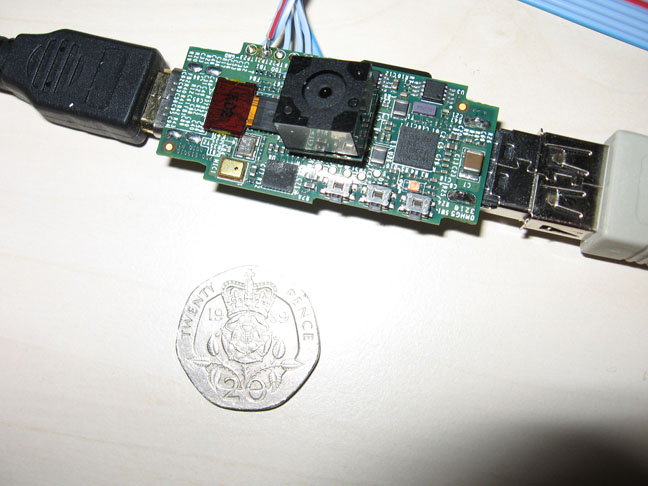
The Raspberry Pi board is a low cost board based on Broadcom BCM2835 media processor SoC with an ARM1176JZF-S core clocked at 700MHz. This board is currently under development and should be ready by end of November, beginning of December and will be sold for 25 USD (128MB RAM – no Ethernet) and 35 USD (256MB RAM – Ethernet).
While we are waiting for the board, we can still test software using qemu to emulate a board based on an ARM1176 core with 128MB or 256 MB memory.
I’ve tried to create a rootfs based on Ubuntu with rootstock but this only support processors with ARM cortex A8 and greater, so it would not work with ARM11. I’ll be using Debian Squeeze instead.
Prerequisites
My host computer is running Ubuntu 10.04.3 LTS, but any recent Ubuntu or Debian installation should work with these instructions. [Update: You won't be able to install qemu-linaro in Debian. [Update in update: Apparently in the latest version of Debian Squeeze, you can just install the default qemu image: apt-get install qemu-system. The build instructions below are for reference in case you use a distro with an older qemu]
You need to cross-compile qemu as follows:
sudo apt-get install libsdl-dev
wget http://wiki.qemu.org/download/qemu-1.0.tar.gz
tar xzvf qemu-1.0.tar.gz
cd qemu-1.0
./configure –target-list=arm-softmmu,arm-linux-user
make
sudo make install
This also seems much faster than Linaro Qemu.]
I’m using qemu-linaro, here’s how to install it:
sudo add-apt-repository ppa:linaro-maintainers/tools
sudo apt-get update
sudo apt-get install qemu-system
Here’s the version I use for reference:
qemu-system-arm --version
QEMU emulator version 0.15.50 (Debian 0.15.50-2011.08-0ubuntu4~ppa10.04.1),
Copyright (c) 2003-2008 Fabrice Bellard
Building the kernel for ARM11
I will basically follow the very clear instructions given at http://raspi.springnote.com/pages/8234994 with some slight modifications. I’ll skip some explanations so refer to the link above to understand exactly what you are doing.
First create a working direcory:
mkdir -p ~/edev/raspberry-pi
Download the latest Sourcery G++ Lite IA32 GNU/Linux TAR package for EABI to your working directory and extract it:
wget https://sourcery.mentor.com/sgpp/lite/arm/portal/package8734/public/arm-none-eabi/arm-2011.03-42-arm-none-eabi-i686-pc-linux-gnu.tar.bz2
tar xjvf arm-2011.03-42-arm-none-eabi-i686-pc-linux-gnu.tar.bz2
Download, extract and patch the kernel for ARMv6 support:
wget http://www.kernel.org/pub/linux/kernel/v3.0/linux-3.0.4.tar.bz2
tar -xvf linux-3.0.4.tar.bz2
wget http://thoronir.net/raspi-dev/linux-arm.patch
patch -p1 -d linux-3.0.4/ < linux-arm.patch
Configure the kernel:
cd linux-3.0.4
make ARCH=arm versatile_defconfig
make ARCH=arm menuconfig
Specify the cross-compiler:
General Setup —>Cross-compiler tool prefix
(We need to enter the path of the toolchain followed by ‘/bin/arm-none-eabi-’)
In my case I entered “/home/jaufranc/edev/raspberry-pi/arm-2011.03/bin/arm-none-eabi-”.
Select the right CPU options:
System Type —>
[*] Support ARM V6 processor
[*] ARM errata: Invalidation of the Instruction Cache operation can fail
Enable ARM EABI:
Kernel Features —>
[*] Use ARM EABI to compile the kernel
[*] Allow old ABI binaries to run with this kernel
Enable qemu’s disk support:
Bus Support —>
[*] PCI Support
Device Drivers —>SCSI Device Support —>
[*] SCSI Device Support
[*] SCSI Disk Support
[*] SCSI CDROM support
[*] SCSI low-lever drivers —>
[*] SYM53C8XX Version 2 SCSI support
Enable devtmpfs:
Device Drivers —>Generic Driver Options—>
[*] Maintain a devtmpfs filesystem to mount at /dev
[*] Automount devtmpfs at /dev, after the kernel mounted the root
Enable tmpfs:
File systems —>Pseudo filesystems—>
[*] Virtual memory file system support (former shm fs)
Enable the event interface:
Device Drivers —>Input device support—>
[*] Event interface
Exit and save the configuration.
Now compile the kernel:
make ARCH=arm
Generating ARMEL Debian Squeeze Rootfs
The kernel build will take a while, so in the meantine you can open another terminal window and prepare the rootfs.
Create an empty rootfs directory and retrieve an armel rootfs for Debian Squeeze:
cd ~/edev/raspberry-pi
mkdir debian_armel_squeeze
sudo apt-get install debootstrap
sudo debootstrap --foreign --arch armel squeeze debian_armel_squeeze http://ftp.debian.org/debian
Once the kernel above is built and debootsrap has completed install the kernel modules in the rootfs:
cd linux-3.0.4
sudo make ARCH=arm INSTALL_MOD_PATH=../debian_armel_squeeze modules_install
The first stage of the rootfs is complete. You’ll notice some important script (e.g. inittab) are missing at this point, but this is normal.
Now let’s create an empty ext2 rootfs (3GB) and copy the rootfs we’ve just created to it:
cd ~/edev/raspberry-pi
dd if=/dev/zero of=rootfs.ext2 count=6M
mkfs.ext2 rootfs.ext2
mkdir mnt
sudo mount -o loop rootfs.ext2 mnt
sudo cp debian_armel_squeeze/* mnt -a
sudo umount mnt
To complete the rootfs, we’ll need to copy the kernel image the working directory and run qemu as follows:
cd ~/edev/raspberry-pi
cp linux-3.0.4/arch/arm/boot/zImage .
sudo qemu-system-arm -M versatilepb -cpu arm1176 -m 256 -hda rootfs.ext2 -kernel zImage \
-append "root=/dev/sda rw init=/bin/bash" -serial stdio
Once you have access to the command line, mount the proc filesystem and complete the bootstrapping process:
mount /proc /proc -t proc
./debootstrap/debootstrap --second-stage
The final steps are to enable the network, give a hostname and create a temporary root password:
printf "auto eth0\niface eth0 inet dhcp\n" >> etc/network/interfaces
echo "raspberry-pi" > /etc/hostname
passwd
That’s it your system is now ready.
You can stop qemu and restart it as follows:
sudo qemu-system-arm -M versatilepb -cpu arm1176 -m 256 -hda rootfs.ext2 -kernel zImage \
-append "root=/dev/sda" -serial stdio
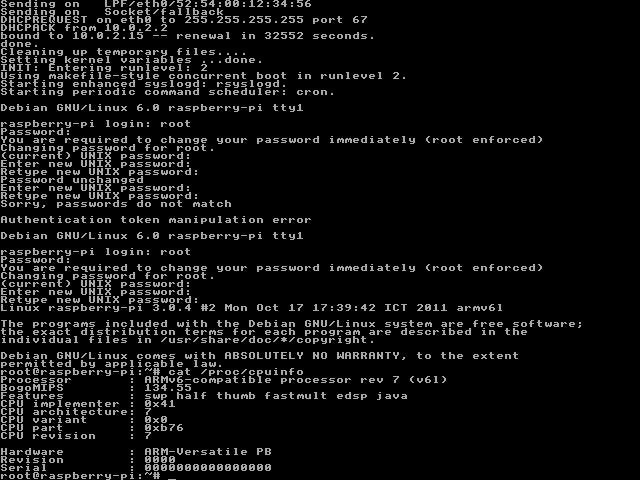
Login as root with your temporary password and you should be asked to change it. After you have access to the command line and can check the CPU details with cat /proc/cpuinfo

You can compile your own program using the cross-toolchain installed above
For those who want to skip the steps to build the kernel and generate the rootfs and just want to run qemu, I’ve uploaded the binary files:
After you download rootfs.ext2.gz you’ll need to unzip it first:
gzip -d rootfs.ext2.gz
The root password is raspberry for the rootfs above.
If you want to install armel binaries using apt-get like you would do on a PC distribution, edit /etc/apt/sources.list as follows:
deb http://ftp.debian.org/debian/ squeeze main contrib non-free
deb-src http://ftp.debian.org/debian/ squeeze main contrib non-free
and run:
apt-get update
Sources: