You may have to replace “/dev/mmcblk0″ by your own SD card device, e.g. “/dev/sdc”.
AllWinner based devices can share the same kernel, but u-boot is board/products specific, so you’ll have to install u-boot for your board. First remove the SD card, re-insert it in order to automatically mount the FAT partition, and run:
sh <uboot-part-mount>/select-board.sh
This will show the list of supported boards and products. Then run the command again for your device. For example:
sudo sh <uboot-part-mount>/select-board.sh mk802
Finally umount the uboot and rootfs partitions. Your Fedora 18 distribution is now ready.
Insert the SD card in your device, connect your device to an HDMI monitor (except for tablets/netbooks), and power it up. It will reboot once as it will automatically resize the rootfs partition to fully utilize your SD card), and it will enter a first boot menu where you’ll be able to create users, and setup Wi-Fi.
Fedora 18 for AllWinner A1X supports most peripherals, but there’s currently no support for Mali 400 GPU, the VPU, and G2D 2D engine.
Fedora 18 should work with the following boards and products:
This version of Fedora 18 is optimized for AllWinner A1x SoCs. So even though you could always install the stock Fedora 18 armhf on your device, this version should perform better, as it does not run all services started in the stock version, and there’s no plymouth, nor initrd.
Following the lack of support by AllWinner for the video engine libraries (CedarX), I had more or less given up on hope XBMC for Linux would ever run properly on AllWinner A10/A13 hardware. But recently, I found out some progress had been made using existing libs, and saw the Pengpod Tablet video showing XBMC running in Linux fairly smoothly.
So I decided to cross-compile XBMC by following the instructions available at http://linux-sunxi.org/XBMC and trying to run it in Linaro ALIP 12.04 rootfs in my Mele A1000. Finally, I managed to cross-compile XBMC, but the performance was very poor in the GUI (6 to 12 fps) and I was unable to play videos and my serial console was flooded with messages like:
[DISP] not supported image0 pixel sequence:216 in img_sw_para_to_reg
[Update: I managed to have XBMC Linux running & playing videos on Mele A1000 by using j1nx image (rootfs + kernel). I would first exhibit the exact same issue I had, but those where fixed:
1. To solve the video playback issue I had to modify script.bin as follows:
fb0_pixel_sequence = 1
fb0_scaler_mode_enable = 0
2. I add to modify XRES/YRES (1024x768) in S99xbmcinit in order to start the UI when outputting to VGA with this image or EGL would failed to initialize.
XBMC (alpha) is currently optimized for 720p (1280x720) resolution, so although I get up to 12 fps using VGA output with 1024x768 resolution, the UI is rendered at over 40 fps when the Mele outputs to HDMI @ 720p.
In this post, I’ll still describe the steps I followed to build and run XBMC in Linaro ALIP rootfs (and hopefully I’ll eventually find the reason behind the performance issue), ans show Jasbir results with XBMC armhf on the Hackberry.
XBMC ARMHF Build Instructions
Since we want to run XBMC armhf, we’ll first need a Linux image with an armhf rootfs. I’ll use Lianro ALIP 12.10 rootfs, following the hardware packs instructions. Insert an SD card in the build machine, and make it bootable:
Enable hard-float in in xbmca10/tools/a10/depends/depends.mk:
USEARMHF=1
and Update the following keys around line 50 in the same file:
#where is your arm rootfs
SDKSTAGE=/home/jaufranc/edev/mele_a1000/xbmc-linux/rootfs
#where is your xbmc install root
XBMCPREFIX=/allwinner/xbmc-pvr-bin$(HF)
#where is your toolchain
TOOLCHAIN=/usr/arm-linux-gnueabi$(HF)
Install some tools required to build XBMC, and create a symlink for the ARM g++ compiler:
After a few seconds, you should now be able to access XBMC user interface. In case you have issues, you can have a look at the log in ~/.xbmc/temp/xbmc.log.
XBMC A10 ARMHF Build on the HackBerry
First of all, this is a development version, so you should not expect a perfect user experience. There should be bugs, crashes, missing features and performance might not be optimal yet.
If you want to have a quick look, watch Jasbir video of XBMC armhf on the HackBerry board.
I did try to use Jasbir image on the Mele A1000 (After updating U-Boot and U-Boot SPL) to evaluate the current status of XBMC on A10, but I could only see XBMC boot logo before the system reboot, as XBMC actually terminates, after apparently thinking I pressed some key….
At the current stage of development, XBMC for Linux appears to work pretty well on AllWinner A10 devices, but there is still more work to do before users can enjoy it on their devices.
1GB RAM version – Available by the end of the month for $65.
Both boards features a 4GB Flash, a SDHC slot, 2x USB 2.0 port, 10/100 Ethernet, Wi-Fi, HDMI & composite outputs, headphone & microphone ports and a IR sensor.
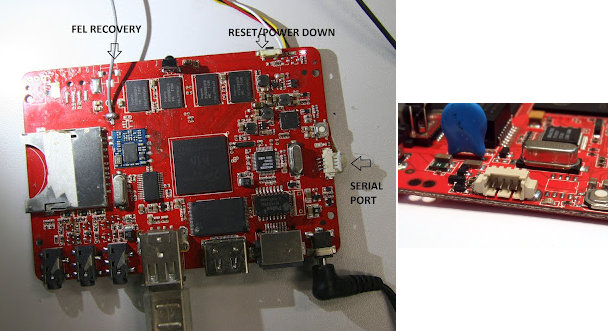
The good thing is that serial interface and FEL connectors will be soldered on the board for easy debugging and recovery.
The FEL recovery port allows to reflash the board using Livesuit. As a side note, Henrik, a developer involved in Allwinner A10 software development, has done some work to reverse engineer FEL USB protocol, wrote a small program to enter into Livesuit mode with an SD card (Go to the bottom of the page section “Forcing FEL boot mode without bsp/recovery/usbboot button” for details) and the fel utility, a “script interface for talking to the FEL USB handler built into the CPU”. I haven’t really checked this into details, but the way I understand it, it will eventually be possible to access the serial console via FEL using a USB gadget driver.
As I mentioned in my previous post, I hoped the 1GB version to be sold for $60 or lower, but it’s finally sold for $65, which is still OK, but $18 (DHL) shipping makes the 512 MB version cost $78, so I still prefer the Mele A1000 which is also hackable, has more features, and can be found for around $83 including shipping via China Post. It would become more interesting if Miniand had a low cost shipping option as well, as it would decrease the cost and the likelihood of paying custom duties in some countries. (btw, I’ve just learned there is a ~100% custom duty on imports > $50 in Brazil. This is insane!)
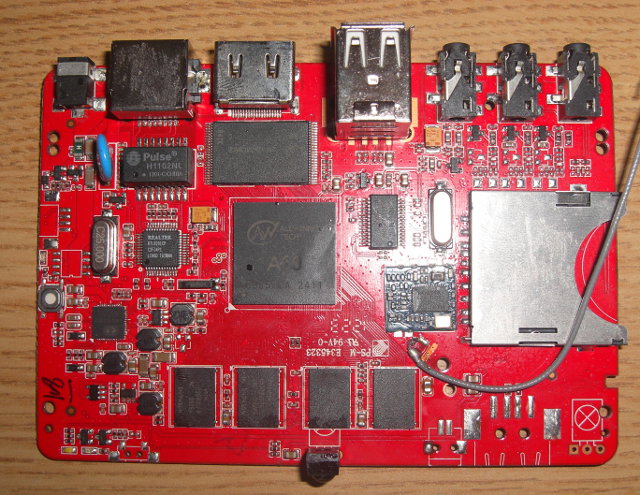
After the Raspberry Pi, the Gooseberry, here comes the HackBerry. This is another AllWinner board similar to the Gooseberry, but which Ethernet, a full sized USB ports, an IR sensor and 1GB RAM.
Hackberry
Here are the board specifications :
SoC – AllWinner A10
System Memory – 1 GB RAM
Storage – 4GB Flash + SDHC slot
USB – 2x USB 2.0 ports
Connectivity:
10/100Mbit Ethernet
Wifi – 802.11 b/g/n
Video Output – 1 x HDMI + 1x Composite
Audio I/O – Headphone + microphone
IR sensor
The board runs Android 4.0, but since it’s an AllWinner device, you can run what you want. In a way it’s similar to the Mele A1000, except it has more memory, but lacks SATA, VGA output and has one less USB port. I can’t see the serial port pins on the PCB picture either.
There is pricing information or availability yet, as Jasbir only ordered 2 for now, and is looking to see if there are some persons interested by this board. I think it could be a very interesting board, if it can sell less than $60.