Tizen has converged all Tizen SDK for mobile, wearables, and TV to Tizen Studio since the beginning of the month, and released Tizen Studio 1.0 for developers interested in developing app for Tizen smartphones, TVs and/or smartwatches such as the latest Samsung Gear S3. So instead, you’ll now be able to select the targets platform and profiles within Tizen Studio. Some of the key changes made to the development environment in Tizen Studio 1.0 include: Launching tools: Installer, Uninstaller, and Package Manager Developing tools: IDE perspective theme, Project Wizard, Certificate Manager, and Menu and tool icons UI tools: UI Builder, Component Designer, and EDC Editor Testing tools: Emulator Testing tools: Dynamic Analyzer for memory and CPU profiling Other improvements in Tizen application development environment Tizen Studio is available for the 32-bit and 64-bit version of Windows, and Ubuntu, as well as for Mac OS with one version with the graphics […]
Magic Device Tool Helps You Switch Between Android and Ubuntu on Supported Phones
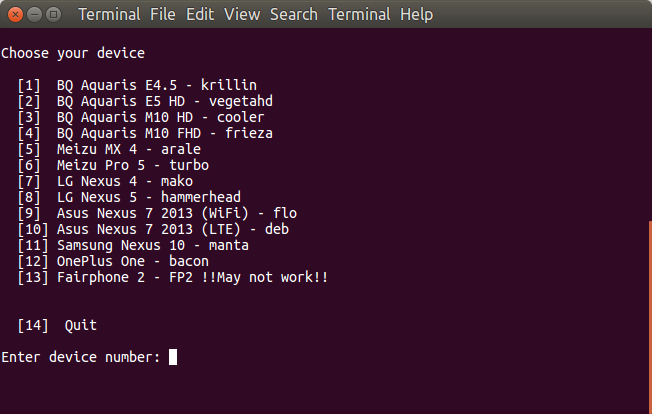
There have only been a few phones released with or supporting Ubuntu so far, and those phones will normally be able to run Android too since Ubuntu Touch relies on Android drivers, and you may decide that Ubuntu is not for you and switch back to Android, or the contrary, if you’ve purchased an Android phone, you may want to install Ubuntu instead. In order to simplify the task of installing operating systems, Marius Quabeck has developed “Magic Device Tool“. As you can see from the screenshot above, 13 phones and tablets are currently supported. You’ll need a computer with Ubuntu 15.04 or greater to install the tool, and I’ve done so on Ubuntu 16.04:
|
1 2 3 4 |
git clone https://github.com/MariusQuabeck/magic-device-tool.git cd magic-device-tool chmod +x launcher.sh ./launcher.sh |
The script will also install phablet-tools if it is not already installed, so if you are not root, you’ll need your account to be member of sudoers. Once the initial setup is done, you’ll […]
DVB Channel Editor Tools for K1 Plus T2 S2 Android TV Box
K1 Plus T2/S2 is one of the most popular Android TV boxes with digital tuners, including both DVB-T2/T/C and DVB-S2/S tuners, and I get frequent comments and questions on K1 Plus T2 S2 review. One of the often asked request is a channel editor to use on a computer, in order to change the names, the order of channels, and set favorites. You can export the DVB data from the DTV app in Android with all data stored in dtv_user_data directory, and in theory, one web based editor is supposed to let you do just that, but it did not work for me. Another option shared with us by gabywap is K1_Plus_Editor.exe (Mirror) developed by Sm0ke, who appears to mostly frequent Russian forums. So I downloaded it, and launched it with Wine in Ubuntu 16.04, but the channel data I had could not load, and the program showed some error […]
GradientOne Brings Oscilloscopes, Spectrum Analyzers, Frequency Generators… to the Cloud
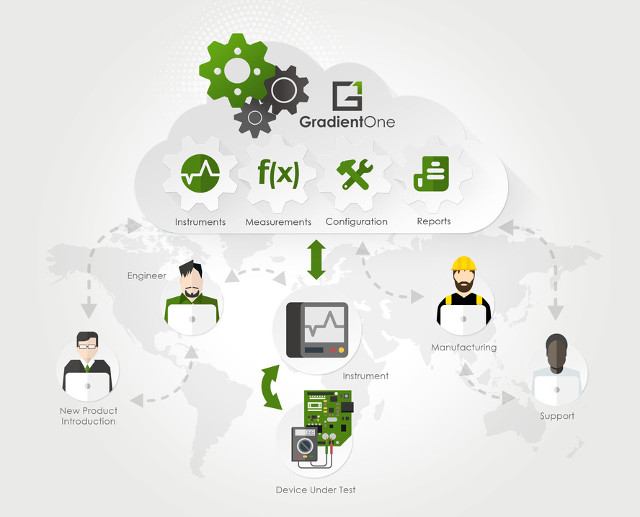
Nowadays, product development often involves working with teams spread across the world, with for example hardware development in the US, software development in India, and manufacturing in China. Resolving issues may require several members of the teams to gather data and work together, and beside the distance issue, you have to handle different timezones too. GradientOne may help facilitating hardware and firmware debugging by connecting test equipments such as oscilloscopes, spectrum analyzers, frequency generators and others to the cloud, so that data can easily be shared, and any member of the team control the equipment remotely, even automatizing measurements if needed. It could also be useful to field application engineers who may bring portable equipment to the customer premises, and have one engineer investigate issues remotely. There are two ways to integrate equipment with GradientOne: Web user interface to control instruments, set parameters (e.g. trigger, acquisition type, etc), via the […]
Bagel is a Smart Bluetooth Tape Measure Compatible with Android and iOS Phones (Crowdfunding)
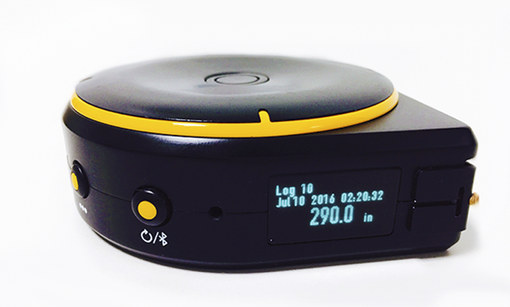
The tape measure is a pretty simple tool allowing you to measure length, and I assume most people will write results on a piece of paper. Battery powered Bagel tape measure changes that as it allows measurements with a string, through a wheel, or an ultrasonic sensors, store the data in its internal memory with voice to text memo, and also sends back data over Bluetooth to your smartphone. Bagel Labs tape measure specifications: Three measure modes – string (up to 3 meters), wheel (up to 10 meters), or ultrasonic sensor (0.3 to 5 meters) Storage – 32 MB flash for up to 100 measurements and voice memo (Both metric and imperial units supported) Connectivity – Bluetooth 4.0 LE Audio – Microphone for voice to text recording Display – 0.96″ OLED display; 128×96 resolution USB – 1x micro USB port for charging Misc – laser pointer for ultrasonic measurement; save […]
Google Research PRUDAQ is a 40MSPS ADC Data Acquisition (DAQ) Cape for BeagleBone Black & Green
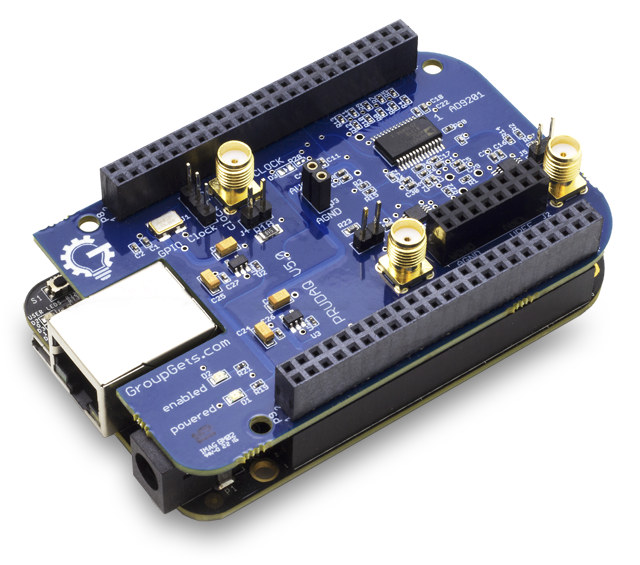
Engineers at Google Research wanted to measure the strength of a carrier signals without having to use a bulky oscilloscope or DAQ (Data Acquisition) system, so they looked into several makers boards to achieve this task, eventually decided to go with BeagleBone Black / Green, and created their own PRUDAQ cape capable of sampling 40 million samples per second, and open source it all. PRUDAQ cape specifications: Dual-channel simultaneously-sampled 10-bit ADC (Analog Devices AD9201) Up to 20MSPS per channel (40MSPS total) theoretical 0-2V input voltage range (DC coupled) 4:1 analog switches in front of each channel provide a total of 8 single-ended analog inputs. (See here for differential input) SMA jacks for direct access to the 2 ADC channels Flexible clock options: External input via SMA jack Internal on-board 10MHz oscillator Programmable clock from BeagleBone GPIO pins Powered via BeagleBone headers – no external power needed Fully exposed BeagleBone headers […]
Run Android Apps in Linux with Shashlik Android Emulation Layer
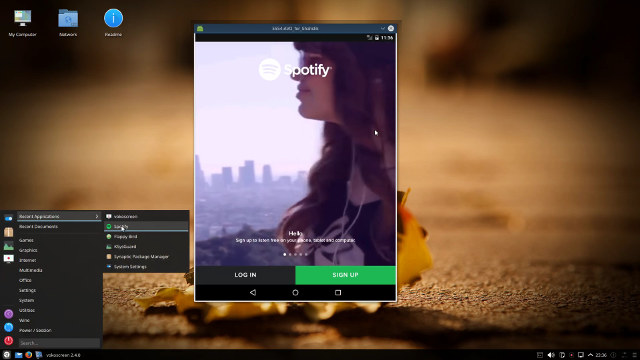
There are already ways to run Android apps in Linux distributions such as Ubuntu or Debian, including the Android SDK emulator, running Android-x86 or Remix OS in a virtual machine, or using Genymotion, but those solutions are a little cumbersome to setup. Shashlik Android emulation layer aims to simplify the process of running Android apps in their own window within Linux desktop distributions. The Android apps can be started from the start up menu or dash like any Linux program. The apps are currently running inside an emulator so you actually boot a stripped down version of Android each time you start the app, which means they’ll take a little while to start. OpenGL and graphics are all rendered on the host for better performance. In the future, the emulator (virtual machine) may be dropped, and instead Shashlik could simply become a container, which requires rewriting libbinder in userspace There […]
BayLibre ACME Cape for BeagleBone Black Measures Power and Temperature with Sigrok
Sigrok open source signal analysis software suite had a major release last week-end with libsigrok 0.4.0, libsigrokdecode 0.4.0, sigrok-cli 0.6.0, and PulseView 0.3.0. The new version added numerous bug fixes for supported hardware such as UNI-T UT61E digital multimeter or USBee AX Pro logic analyzer, and added support for several logic analyzers, oscilloscopes, multimeters, programmable power supplies, an electronic load, an LCR meter, a scale, and one BeagleBone Black cape, namely BayLibre ACME. The ACME initiative was launched in order to get rid of the limitations of proprietary solutions, and provide an open source hardware and software multi-channel power and temperature measurements solution to the community. BayLibre ACME cape supports up to 8 probes to measure VBUS (0 to +36V), VSHUNT ( 2.5uV up to 81.92mV), CURRENT AND POWER. Three current / power probes have been developed with all featuring TI INA226 for the ADC conversion: ACME HE10 Power Probe […]