Archive

Posts Tagged ‘design west’

Design West Summit – 23-25 April 2013

April 9th, 2013 No comments

design_west_2013Design West 2013, previously known as the Embedded Systems Confertence, will take place later this month, on 23-25 April to be exact, at San Jose McEnery Convention Center in San Jose, California, US. The event will be divided into 22 tracks dealing with software development, hardware design, operating systems, security and more:

  • Android Certificate Program – Two-day hands-on embedded android workshop.
  • Black Hat Summit – The Black Hat Embedded Security Summit will provide electronics professionals with essential information and tools, as well as a forum for the discussion and evaluation of the latest solutions for securing their embedded systems. Training courses will focus on topics such as Network Security, Incident Response, Web Application Security, and Exploit Development.
  • Connectivity and Networking – The Connectivity and Networking track educates design engineers on wired and wireless communications, spanning need-to-know topics from essentials of USB device development to antenna and RF system design.
  • Debugging and Test – This track features a mix of lectures focusing on useful insights on troubleshooting real world embedded software, and tips and tricks with highly practical takeaways that embedded systems designers can apply immediately.
  • Embedded Android – This track covers the tradeoffs of Android versus Linux in a real-world case study, teaches engineers how to streamline Android implementation on embedded systems, and provides information on how to apply USB technology and provide connectivity to various configurations of Android platforms.
  • Hardware: Design, I/O, and Interfacing – This track examines how to ameliorate the challenges associated with design element such as the interface between hardware and firmware; synchronizing I/O, integrating embedded vision and motion control, and leveraging existing sensor drivers.
  • Internet of Things – This track covers some of the specific challenges and opportunities for embedded designers, including today’s fragmented sensor and device market, the move from IPv4 to IPv6, and the return to resource-constrained embedded systems.
  • Linux Kernel and Operating Systems – The Linux Kernel and Operating Systems Track focuses on the kernel itself, and the operating system and programs running above it. Sessions cover best practices for engineers to leverage the use of open source software within embedded systems while avoiding common pitfalls, plus a session showing how Linux, though not a real time kernel, is likely good enough for your application.
  • Low-Power Design – The Low-Power Design track covers the latest techniques to conserve power at the system; architectural and component level as well as the advantages and trade-offs of different power optimization techniques.
  • Processors and Programmable Devices – The Processors and Programmable Devices track focuses on embedded systems that feature the use of processors (MPUs, MCUs, DSPs) and/or programmable devices (FPGAs, Programmable SoCs).
  • Programming – The Programming track focuses on embedded system programming languages, tools and techniques. Sessions provide practical tips and tricks and actionable information that developers can apply immediately to their code.
  • Prototyping – The Prototyping track focuses on the science and art of rapidly creating embedded systems for proof of concepts, demonstrations and iterative product developments.
  • Real Time Operating Systems – This track focuses on delivering real-time performance with the assistance of a real-time scheduler and related tools and techniques. Sessions include practical information on the design of real-time embedded systems that will be timely and predictable, design options for achieving real time without an RTOS, and the application of RTOS in safety critical applications.
  • Safety, Security and Hacking Embedded Systems – The Safety, Security, and Hacking Embedded Systems covers the latest techniques for designing and managing more secure systems. Sessions cover a mixture of hacking history, security knowledge, techniques for building more secure embedded system, and coping with the special case of Android.
  • Software Architecture and Design – Using practical, real-world advice from experts, this track will guide you through everything from requirements and specification development techniques, to optimizing your multicore and user-interface design. Agile design techniques will also be introduced.
  • Software Development – The Software Development Track will guide you toward a more disciplined approach to software development to improve performance, while emphasizing agility. A special session on common traps and pitfalls when developing real-time software will underscore the importance of such approaches.
  • Systems Engineering – The Systems Engineering Track’s objective is to improve analytical skills, impart an enhanced understanding of the impact of your engineering decisions on others on the design team, and the impact of other decisions on you. Engineers will learn the benefits of looking at the big picture, in addition to focusing only on the detail.
  • Hello World! – Track engineers share their embedded design experiences and provide information that will help you bring your ideas to life more quickly and successfully.
  • Lessons and Lessons Learned – Engineers share their successes and failures along with some practical tips, tricks, and how-tos to jump start your next big embedded systems project.
  • Connected Devices – Learn about the whacky wonderful future of mobility and learn about some real world examples of products with embedded systems that are already talking to the cloud.
  • Tech Fundamentals – This 3-day series consists of 18 45-minute sessions designed specifically for engineers who are new to embedded or experienced embedded engineers who want an introduction to topics outside of their core expertise. These practical sessions delivered in a tutorial format cover topics ranging from Embedded 101 to Analog for Digital Designers to Why the Programming Language C matters.
  • Hands-on Speed Training – Attendees can get some drive time on the latest development boards, hardware, and software tools and face time with expert engineer-trainers.  Developments boards include Arduino, Beaglebone, Raspberry Pi… software tools include Microchip MPLAB X, TI WEBENCH Power Designer, etc..

To select the sessions, the best way is to use the schedule builder available on UBM website.

If you plan to only access the expositions, attend a few of the many vendor-sponsored sessions, and listen to keynotes, the pass (Expo Only Pass) is free and you only need to register. For details about the other pass see table below.

All Access
Pass
Expo
Plus Pass
Expo Only Pass Black Hat
Summit
Advanced | Feb 16 – Apr 18 $1,999 $199 Free $1099
Onsite | April 19 – 25 $2,299 $199 Free $1199
Conference Sessions
April 21 – April 25
Check
Black Hat Conference Sessions
April 23 – April 24
Check Check
Monday Workshops Check
Monday Lunch Check
Vendor Sessions
April 22 – April 25
Check Check Check Check
Keynotes
April 23 – April 25
Check Check Check Check
Expo
April 22 – April 25
Sketch to Shenzhen, Fundamentals, and Hands-On Training Lab Included
Check Check Check Check
Parties & Giveaways
April 22 – April 25
Check Check Check Check
DESIGN West Conference Proceedings Check Check
Black Hat Summit Proceedings Check Check
Android Certification
April 22 – April 23
Check
IEEE Certification
April 22 – April 25
Check
Expo Plus Extras

– 3 Class Passes
Check

Further details are available on Design West Official Website.

Digg This
Reddit This
Stumble Now!
Buzz This
Vote on DZone
Share on Facebook
Bookmark this on Delicious
Kick It on DotNetKicks.com
Shout it
Share on LinkedIn
Bookmark this on Technorati
Post on Twitter

Green Hills MULTI 6.0 Compiler Improves ARM MCU Performance by up to 40%

April 3rd, 2012 No comments

Green Hills Software LogoLast week at Design West 2012, Green Hills Software announced it had achieved the highest compiler performance scores ever certified by EEMBC CoreMark and that it outperformed the nearest competing compilers by 35.5% using its MULTI 6.0 – Compiler 2012.

Benchmarks were completed on 3 ARM Cortex-M4 microcontrollers:

  • Freescale Kinetis K60 MCU @ 100 Mhz – 35.5% improvement over nearest competitor.
  • Freescale Kinetis K70 MCU @ 120 Mhz – 29.6% improvement over nearest competitor.
  • STMicroelectronics STM32F417IGt6 @ 168 MHz – 34.7% improvement over nearest competitor.

Since apparently it’s bad marketing to name competitors in press releases, I went directly to the source (EEMBC Coremark benchmark results) to check out the results and competitors (IAR and Keil) for Kinetis K60 MCU.

The first thing you may notice is that there are 2 tests per compiler / MCU combination. That’s because there 2 test configurations:

  • Code in internal Flash – Data in internal RAM
  • Code in internal RAM – Data in internal RAM

Other parameters such as the compiler flags appear to be the same in both tests. Let me know if I missed something.

The first test results (Code in internal Flash – Data in internal RAM):

Compiler CoreMark/Mhz Coremark Improvement
Green Hills Multi v6.0.0 – Compiler 2012 2.43 243.4
IAR v6.10.5 2.05 204.65 18.9%
Keil uVision v4.20 2.12 211.89 14.9%

This first test shows Multi 6.0 beats IAR v6.10.5 by 18.9% and Keil uVision by 14.9%.

But it’s in the second test (Code in internal RAM – Data in internal RAM) that Multi 6.0 destroys the competition:

Compiler CoreMark/Mhz Coremark Improvement
Green Hills Multi v6.0.0 – Compiler 2012 2.94 293.84
IAR v6.10.5 2.07 207.44 41.7%
Keil uVision v4.20 2.17 217.3 35.2%

In that test, Green Hills Multi 6.0 – Compiler 2012 (Why such a long name?) handily beats Keil uVision and IAR by respectively35.2% and 41.7%.

This type of benchmark may not always accurately reflect real-life benchmark, but still if you’re reaching the limits of your MCU, you may want to consider using this compiler instead of spending days or weeks optimizing your C  and/or assembly code manually.

MULTI 6.0 – Compiler 2012 was released in September 2011 and the latest version MULTI 6.1 – Compiler 2012.1 has been released on the 27th of March 2012.

Green Hills Software may do a great job at optimizing compilers, but information about Multi 6.x compiler is nowhere to be found in their website, so I can only guess it’s only part of their MULTI IDE.

You may be able to find more information on Green Hills compiler and MULTI IDE pages.

Digg This
Reddit This
Stumble Now!
Buzz This
Vote on DZone
Share on Facebook
Bookmark this on Delicious
Kick It on DotNetKicks.com
Shout it
Share on LinkedIn
Bookmark this on Technorati
Post on Twitter

ARM Development Studio 5 (DS 5) Demos At Design West

March 31st, 2012 No comments

ARM has shot a few video demos of their ARM Development Studio 5 (DS 5), a software development tool suite for ARM platforms, at Design West 2012.

The first video shows DS 5 running on the Xilinx Zynq-7000 platform (dual cortex A9 + FPGA), and we can see the memory map, registers, call graphs and stack usage. We can also see real-time processor switching and the function that takes the most CPU resources (profiling).

The second videos showcases ARM DS-5 Streamline, a performance analyzer, which helps determine how well programs are running on a Linux or Android platform, on an Samsung Exynos 4210 platform (Origen board?). This tool also to profile both the dual-core ARM Cortex-A9 and ARM Mali-400 MP GPU in the platform.

We are shown three types of reports:

  • CPU/GPU Loading
  • Threads usage
  • Power Usage per application

The third and last video shows ARM DS 5 on Freescale i.MX6 running Linux SMP, where the software allow developers to monitor threads per CPU, the call stack, trace history and register values.

ARM DS 5 development suite is not free, but if you are an individual developer or a small company with less than 10 developers, you can always use ARM DS 5 Community Edition which is provided free of charge.

Digg This
Reddit This
Stumble Now!
Buzz This
Vote on DZone
Share on Facebook
Bookmark this on Delicious
Kick It on DotNetKicks.com
Shout it
Share on LinkedIn
Bookmark this on Technorati
Post on Twitter

Virtual Hardware Platforms: Test & Debug Software Before the Silicon is Ready

March 28th, 2012 2 comments

Historically software could only be tested and debugged when the first silicon sample was ready, and the software team could not participate in the design process.

But thanks to Virtual Hardware Platforms, software can be executed at speeds close to real time on an abstract model of the hardware, available long before a design has been completed. The virtual platform is designed to simplify the creation and support of virtual prototypes and allow design teams to begin developing software weeks to months before a hardware prototype is available, and software teams can use it as their application development platform. For example, Freescale is using a Virtual Hardware Platform for their new Vybrid Controllers to emulate both Cortex A5 and Cortex M4 cores, as well as peripherals and run OS such as Linux or MQX before the Controllers are ready (Q2 2012).

Cadence Virtual System Platform Block Diagram

Cadence Virtual System Platform Software and Hardware

One Virtual Hardware Platform has just won the ACE AWARDS ULTIMATE PRODUCTS of 2011 in the Software category. The Cadence’s Virtual System Platform (part of Cadence System Development Suite) is based on SystemC TLM 2.0 and IEEE 1666 standard (open SystemC models), supports third-party processor models (ARM Fast Models, Imperas OVP models),  Legacy RTL languages (Verilog, VHDL and SystemVerilog), third-party software debuggers (ARM DS 5, Lauterbach, GDB) and scales from single-core to multi-core software development and debug with performance reaching hundreds of MHz.

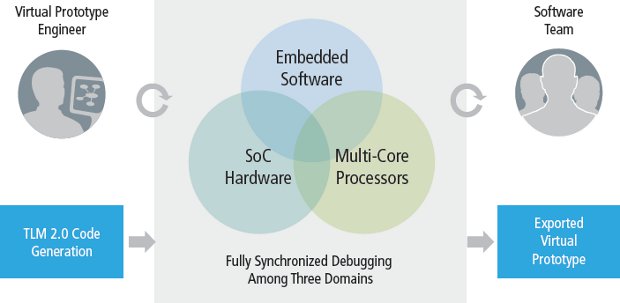
The Virtual System Platform debug GUI provides fully synchronized, coherent multi-core hardware/software (HW/SW) debugging. It comes with consistent breakpoints, single stepping, probing, tracing, and memory/register source-level debugging in either HW or SW models. Hardware debugging is based on a virtual platform-aware abstraction, built on a core of TLM-aware and SystemC debugging features.  The GUI itself is segmented and can be configured for the views most familiar to software or hardware engineers, or a combination of the two for efficient HW/SW debugging.

Figure 2: Coherent hardware/software debugging

Cadence Virtual System Platform GUI (Click to Enlarge)

You can use models for all sort of basics I/O including UART, keyboard/mouse controller, real time clock, programmable timer, interrupt controller, multimedia card, audio codec interface, programmable LED, color LCD, etc.  Cadence also provides most advanced models for Ethernet, controller, I2C, SPI, bus controller,
serial interface, buffer, memory logger, battery, touch screen input, flash memory, initiator, multi-plexor, arbiter, router and more.

In your use such software to create a system,  you’ll need a Linux machine with the following requirements:

  • 64-bit Red Hat Enterprise or SUSE Enterprise
  • 32GB of RAM

For software development in C/C++/Assembler, a 32-bit or 64-bit Red Hat or Suse Linux distribution with at least 2 GB of RAM is required.

You can get more information on Cadence Virtual System Platform page. Other virtual hardware platforms include Wind River Simics Virtual  Platforms and the open source Imperas OVPsim simulator with examples for different processor models (ARM, MIPS, ARC, NEC v850, openCores OR1K, PowerPC).  All of processor and peripheral models are a;sp open source and can be downloaded (after free registration) on OVPWorld.org forum.

Digg This
Reddit This
Stumble Now!
Buzz This
Vote on DZone
Share on Facebook
Bookmark this on Delicious
Kick It on DotNetKicks.com
Shout it
Share on LinkedIn
Bookmark this on Technorati
Post on Twitter

Freescale Vybrid Controllers: Cortex A5 + Cortex M4 Solutions

March 27th, 2012 No comments

Freescale announced the new Vybrid platform based on Cortex A5 application processor and Cortex-M4 MCU (VF6xx and VF7xx family only) which targets building/home automation and control, industrial automation, point-of-sale systems, medical devices, smart energy equipment, and appliances.

Cortex A5 + Cortex M4 Processor

Freescale Vybrid Controllers Comparison

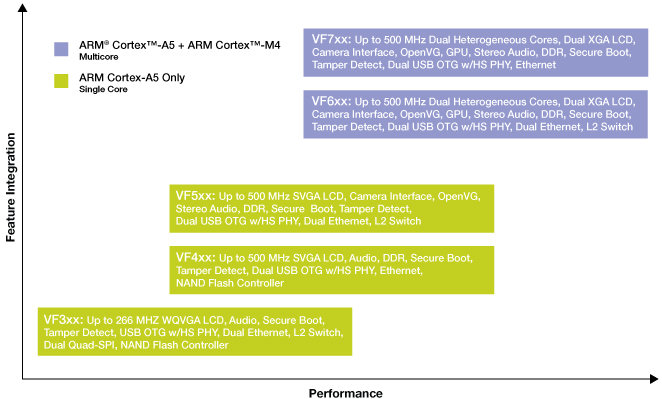
There are 5 families of Vybrid Controllers which support the following common features:

  • Video/Camera Interface Unit + optional OpenVG GPU (except VF3xx)
  • Up to 800 MHz data rate DDR3 and LPDDR2 support (except VF3xx)
  • USB 2.0 OTF with Integrated PHY (1 or 2 depending on model)
  • Ethernet 10/100 MAC (1 or 2 depending on model)
  • Display controller (WQVGA to XGA resolutions)
  • High-assurance boot with Crypto Acceleration
  • Up to 1.5 MB on chip SRAM
  • NAND Flash controller and Dual Quad-SPI with eXecute-In-Place(XIP)
  • Dual 12-bit ADC and DAC

Here are the 5 families of Vybrid platforms and key differentiating features:

  • VF3xx: ARM Cortex-A5 up to 266 MHz, 1x USB 2.0 OTG, 2x Ethernet, display up to WQVGA resolution (400 x 240)
  • VF4xx: ARM Cortex-A5 up to 500 MHz, 2x USB 2.0 OTG, 1x Ethernet, display up to XGA resolution (1024 x 768)
  • VF5xx: ARM Cortex-A5 up to 500 MHz, 2x USB 2.0 OTG, 2x Ethernet,display up to XGA resolution (1024 x 768)
  • VF6xx: ARM Cortex-A5  up to 500MHz and Cortex-M4, 2x USB 2.0 OTG, 2x Ethernet, display  up to XGA resolution (1024×768)
  • VF7xx: ARM Cortex-A5 up to 500 MHz and Cortex-M4, 2x USB 2.0 OTG, 1x Ethernet, display up to XGA resolution (1024 x 768) and Video ADC

The lower-end devices (VF3xx to VF5xx) target low power application processing, whereas high-end solutions (VF6xx and VF7xx) target high-resolution graphical displays, connectivity and real-time support.

Freescale Cortex A5 + Cortex M4 Block Diagram

Freescale VF7xx Block Diagram

The Vybrid platform supports operating systems such as Linux and Freescale MQX RTOS either running one at a time or concurrently (e.g Linux on Cortex A5 and  MQX RTOS on Cortex M4).  Freescale will also provides a set of software stacks via its MQX Solutions including acommunication (RTCS), file system (MFS)  and USB host/device stacks. Supported development tools include ARM DS5 and Freescale MQX Design and Development Tools.

The Freescale Vybrid platform and corresponding software and tools will be available in Q3 2012 (first samples in Q2 2012). I could not find information about development boards for the time being. They will use a Virtual Hardware Platform for development at this stage and demo the platform this week at Design West.

You may be able to find more information on Freescale Vybrid Controller Solutions page.  For in-depth details about the Freescale Vybrid platform, you can read the 68-page BeyongBits issue fully dedicated to the subject.
Although Cortex A5 core has been announced in 2009 and officially released in 2010, Freescale Vybrid platform appears to be one of the rare solution (the only?) to feature an ARM Cortex A5, you may want to read the following Cortex A5 presentation (Thanks Guillaume!) to learn more about it and its target applications (Mobile, STB, networking, PoS…).
Digg This
Reddit This
Stumble Now!
Buzz This
Vote on DZone
Share on Facebook
Bookmark this on Delicious
Kick It on DotNetKicks.com
Shout it
Share on LinkedIn
Bookmark this on Technorati
Post on Twitter

FSLBOT: Freescale (Dancing) Robot Kit

March 26th, 2012 No comments

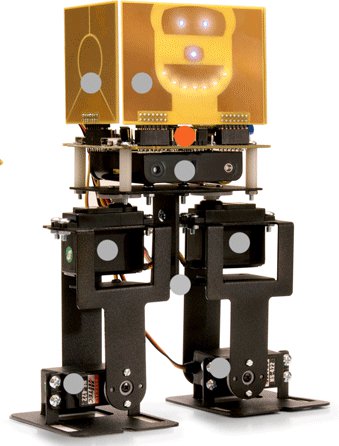
Freescale unveiled the FSLBOT prototype last year (and I missed it!), and today, the company has announced further improvements to the Freescale Tower System mechatronics robot and board, a bipedal robot and development board that allows designers to write software for a variety of sensor applications while making a robot walk and respond to touch, motion, vibration, tilt and other external stimuli.

Wireless Robot Can Walk, Dance and Teach Sensor Programming

FSLBOT: Freescale Robot Kit

The new version of the robot uses a new programming language based on StickOS, has wireless capabilities and adds an Xtrinsic MAG3110 magnetometer.

This robot has been designed with the collaboration of StickOS and CPUStick.com with the goal “to create a tool that would enable casual users and consumers of technology to become creators and innovators”.

The Freescale FSLBOT Robot Kit comes with the following:

  • Freescale Tower System mechatronics board powered by a 32-bit ColdFire MCU with 64K of RAM and 512K of flash.
  • Leg mechanics and associated hardware.
  • Expressive “face” with 12 touch pads and 7 LED’s for user interaction.
  • 4 PWM-controlled RC servos.
  • A three-axis accelerometer.
  • A 12-channel touch sensor .
  • Freescale MC13201 transceiver for RF communication.
  • Xtrinsic MAG3110 magnetometer for more accurate compass heading information. (Optional device adapter)

The Freescale Tower System mechatronics board can be used standalone with its 3-axis accelerometer and 12-channel touch sensor and with sensor adapter boards. The robot can be programmed using real-time BASIC language in StickOS or C/C++ using the CodeWarrior IDE. If you are interested you can have a look at StickOS BASIC samples for FSLBOT.

Freescale has not released a video of the new version of the robot in action yet, but only an unboxing video:

The Tower System mechatronics robot, Tower System mechatronics board and sensor adapter boards are available now and can be ordered directly online.

In their press release, Freescale announced the following items are available for purchase:

  • FSLBOT (199 USD) – includes the Tower System mechatronics board, four PWM-controlled RC servos, leg mechanics and associated hardware, assembly instructions, a Tower System mechatronics board user guide and a quick start guide
  • TWR-MECH (99 USD) – includes an MCF52259 32-bit ColdFire MCU and MPR121 touch sensor, Tower System mechatronics board user guide and quick start guide
  • LFDA8451 (25 USD) provides a device adapter for the Freescale Xtrinsic MMA8451Q 14-bit 3-axis accelerometer
  • LFDA3110 (25 USD) provides a device adapter for the Freescale Xtrinsic MAG3110 3-axis magnetometer

The TWR-MECH (The mechatronics board) appears to be already included in FSLBOT, so you should be able to get a working kit for just 199 USD, and you don’t need to purchase the TWR-MECH separatly. I also understand that the 3-axis accelerometer is part of the mechatronics board, and it’s only the magnetometer adapter that needs to be purchased separately.

You can get more information on Freescale FSLBOT page and the Mechatronics Board page.

In the (unlikely) case you are at Design West, you can also attended a workshop entitled “Experiment with Freescale Sensors and Mechatronics Robot” on Thursday March 29th, 12:30-14:00. For further details check out Freescale at DESIGN West.

Digg This
Reddit This
Stumble Now!
Buzz This
Vote on DZone
Share on Facebook
Bookmark this on Delicious
Kick It on DotNetKicks.com
Shout it
Share on LinkedIn
Bookmark this on Technorati
Post on Twitter

Qualcomm Atheros AR4100P Provides WiFi Connectivity to the Internet of Things

March 21st, 2012 No comments

In January, Texas Instruments was the first company (to my knowledge) to release a WiFi chip for the internet of things, the SimpleLink Wi-Fi CC3000, where WiFi is mostly implemented in hardware to lower power consumption. Now, the company has some competition with the announcement of Qualcomm Atheros AR4100P, an improved version of its AP4100 WiFi chipset, including IPv4/IPv6 support.

The AR4100 targets the home, enterprise, smart grid and home automation and control applications that have lower data rates and transmit or receive data on an infrequent basis.

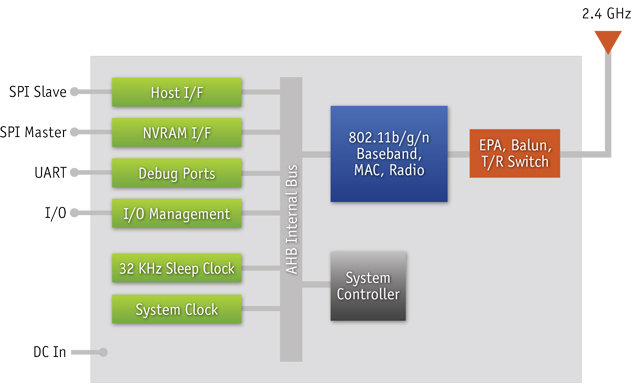
AR4100 WiFi Chip SPI Interface with MCU for IoT

Qualcomm AR4100 Block Diagram

The AR4100 system-in-package (SIP) features the following:

  • Low energy
    • Power saving modes as low as 5 µA
    • Wake-up times as low as 2.2 ms
    • Support for Quad SPI flash for faster wake times
  • Low system resource requirements
    • Low footprint host driver (25K Flash and 8K RAM)
  • Simple, low-cost wireless system integration
    • LGA package simplifies 2- or 4-layer PCB design
    • Near zero RBOM
    • Integrated RF front end, RF shield and clocks
    • Direct connect to a 50-ohm antenna
  • Qualcomm Atheros 802.11n Wi-Fi
    • Integrated high-power, high-efficiency power amplifier
    • On-SIP Wi-Fi protected setup (WPS 2.0)
  • Standard SPI interface for connecting to MCUs
  • FCC Modular SIP Certification

The AR4100P should also feature all of the above, except IPv4/IPv6 is handled by hardware, which allows a lower power consumption (as low as 2 µA) and a lower network  stack footprint in the MCU flash and RAM.

The AR4100P is featured in Qualcomm Atheros’s SP137 development kit, a reference design for low-power IP sensors, which integrates Energy Micro EFM32 Gecko Cortex-M3 MCU and runs Micrium µC/OS-III operating system. Thanks to hardware implementation of most of the network stack, the devkit can operate off AA batteries. IAR Systems Embedded Workbench IDE is used for development. 

AR4100P solutions will be showcased at Qualcomm booth (#2101) at the Embedded Systems Conference (Design West) on March 26-29, 2012.

You can find further information on the (older) AP4100 WiFi chip on Qualcomm Atheros website, as a page for AP4100P does not appear to have been setup yet…

Digg This
Reddit This
Stumble Now!
Buzz This
Vote on DZone
Share on Facebook
Bookmark this on Delicious
Kick It on DotNetKicks.com
Shout it
Share on LinkedIn
Bookmark this on Technorati
Post on Twitter