Archive

Posts Tagged ‘windows 7’

$55 AX-14 DLNA, WiDi & Miracast Dongle Works with Android / iOS Devices, and Windows 7/8 PC

April 10th, 2013 8 comments

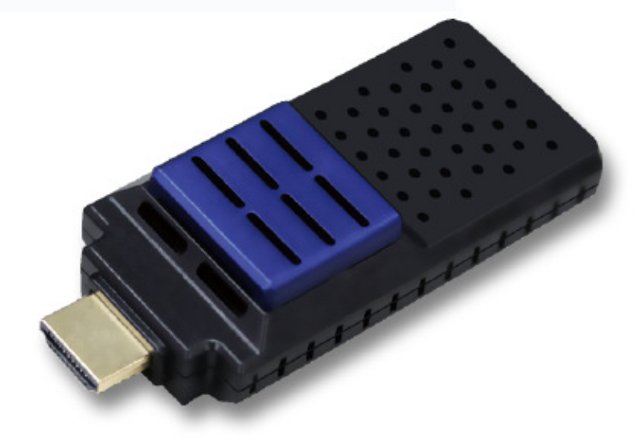
Miracast is a new standard allowing you to play videos or mirror your Android device display on a TV via Wi-Fi direct. All you need is a Wi-Fi device that can be connected to the HDMI and USB (for power) ports of your TV, and decode common video codecs. There are not many devices available on the market, but I’ve just found out about AX-14, a Wi-Di and Miracast HDMI adapter that lets you connect your Windows 7 or 8 to your TV via Wi-Di, or your Android / iOS via Miracast. The device also supports DLNA.

AX-01 Miracast Dongle

AX-01 Miracast Dongle

The hardware specs are said to be as follows:

  • Processor – MIPS24Kc processor (RTD1185PA) @ 500MHz
  • System Memory – 256 MB DDR3 SDRAM
  • Storage – 128 MB NAND Flash
  • Video and Audio engine with HW acceleration
  • Video Codecs & Formats – MPEG-1,MPEG-2,MPEG-4 SP/ASP( Xvid), MPEG-4 AVC(H.264), AVS, VP6, Motion JPEG, H.263 , H.264, DivX 3/4/5/6 (license only), WMV9/VC1, RV8,RV9, MOV, FLV, AVI, MinusVR, MKV, VOB …
  • Audio Codecs – MP3, WMA , WMA pro, WAV, MKA, LPCM, ADPCM, AAC, AIF/AIFF, OGG Vorbis, etc..
  • USB – 1x mini USB 2.0 for power
  • WiFi – Realtek WIFI Module supporting 802.11 b/g/n
  • Video Output – HDMI OUT (Full HD Support – 1080p)
  • Standard – Intel Wireless Display ( WiDi 3.0) / Miracast / DLNA
  • Button – Wake-up and Factory default for SW1 / AP Upgrade and WIDI Switch for SW3
  • Misc -  2x LED: green for power on , red for standby.
  • Power – 5V/0.5A. Typical power consumption is 2 watts.
  • Dimensions – 84.2 x 36.4 x 18.7 mm
  • Weight – 35g

The device is running Linux. There are 3 modes of operations selected with a user button:

  • Direct – The connection between your device and the dongle is done with Wi-Fi Direct.
  • Internet – Your device and the dongle are connected via a Wi-Fi router.
  • Mirroring – Mirrors your device display on the TV via Wi-Di or Miracast standards.

In the first 2 cases, you control the videos to be played with Joylink app for Android. This can work with Android 2.1 and greater. For iOS devices you can use iMediashare instead, and install a DLNA compatible app such as Tencent QQLive HD in Windows clients. Mirroring mode requires a Miracast or Wi-Di certified devices, which means you’ll need a device with Android 4.2 to use this mode. Wi-Di mode requires a computer with an Intel Core i3/i5/i5 processor, and graphics and network chipsets supporting Wi-Di 3.5.

AX-14 product name shows up in reseller website, but further research led me to Tekxon Technology, a Taiwanese company, that appears to be the manufacturer of the device and calls it WFD-01. Your can find a lot of information in WFD-01 page including download link to software, user manual, as well as lots of demo videos.

One of the cool videos they have shows WFD-01 Miracast dongle works with Samsung Galaxy Note 10.1 tablet. They show video playback, and display mirroring including playing a snowboard game apparently with minimal lag.

AX-14 Miracast dongle is available from several shop, but prices vary a lot. From as low as $55 on Aliexpress to about $95 on Geekbuying and some other sites. If Miracast dongles become popular, I’m pretty sure the price will eventually fall below $30 based on the hardware specifications listed above. Please bear in mind that if DLNA seems to for great, the firmware may not currently be perfect with Miracast support, as some users report that it does not work very well with Nexus 4, either because it does not work at all, or the experience is poor:

…the device itself is not the best, I’m afraid. I tried it in Miracast mode with LG Nexus 4, and it works, but the audio is out of sync with the video and the video playback is jerky. Maybe the firmware upgrade could help, but for now I can’t recommend purchasing this device if you want to use it in Miracast mode.

The comment above was made in January, and the seller promised firmware and app update to fix those issues, but I’m not sure of the status now.

If you already have an Android mini PC, I would expect a Miracast “server” app to become available at some points, so this type of device may not be necessary.

Digg This
Reddit This
Stumble Now!
Buzz This
Vote on DZone
Share on Facebook
Bookmark this on Delicious
Kick It on DotNetKicks.com
Shout it
Share on LinkedIn
Bookmark this on Technorati
Post on Twitter

$132 Kingdel NC270 Thin Client Powered by Intel Atom N270

October 26th, 2012 23 comments

Reader onebir tipped me about a low cost Intel Atom based PC on Aliexpress with some decent specs. Kingdel NC270 PC is based on Intel Atom N270 processor @ 1.6 Ghz with 2 GB RAM and 8 GB SSD. It is capable of decoding 720p HD video and features lots of ports which could make it a good entry-level digital signage player among other things.

Here are the specs of this nettop.

  • Processor – Intel Atom n270
  • System Memory – 2 GB (in most places, but it’s also written 1GB in one place in the description)
  • Storage – 8GB SSD (16GB and 320GB version is also available)
  • Connectivity:
    • 10/100 Ethernet
    • WiFi (optional?)
  • Serial Ports – female DB-25, compatible SPP, ECP and EPP | male DB-9, compatible FIFO prefix = st1 16C550
  • 2 PS/2 port (mouse, keyboard)
  • USB – 6 USB host 2.0 ports
  • 1x PCI slot
  • Video Output – VGA port | Composite
  • Audio – Speaker output and Microphone input.
  • Power Supply – Input: 100-140V and 200-260V, 45-65Hz; Output: 12V,48W; external 48W AC adapter
  • Dimensions – 21 x 14 x 4 cm

Kingdel NC270 comes pre-installed with Windows XP Embedded and software to use it as a thin client with support for Citrix ICA and Microsoft RDP 6.1. But since this is an x86 platform you could also install other version of Windows (XP/Vista/7) and/or Linux distributions instead.

The device sells for around $132 on Aliexpress including shipping.

Digg This
Reddit This
Stumble Now!
Buzz This
Vote on DZone
Share on Facebook
Bookmark this on Delicious
Kick It on DotNetKicks.com
Shout it
Share on LinkedIn
Bookmark this on Technorati
Post on Twitter

AMD Introduces AMD G-T16R G-Series APU with 2.3 Watts Power Consumption

June 26th, 2012 No comments

AMD has unveiled another APU in its Embedded G-Series processor family with the AMD Embedded G-T16R, which aims to provide a more powerful (up to 3x) and less power-hungry (7% less) replacement to AMD Geode LX processors. The AMD G-T16R is targeted at very low power, small form factor and cost-sensitive embedded designs. The company claims the processor consumes about 2.3 watts on average or 4.5 watts thermal design power (TDP).

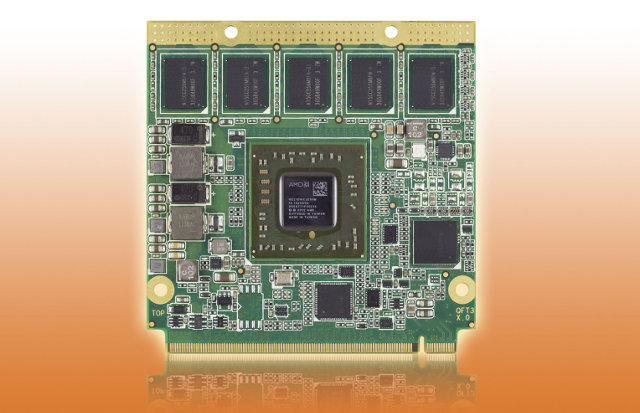
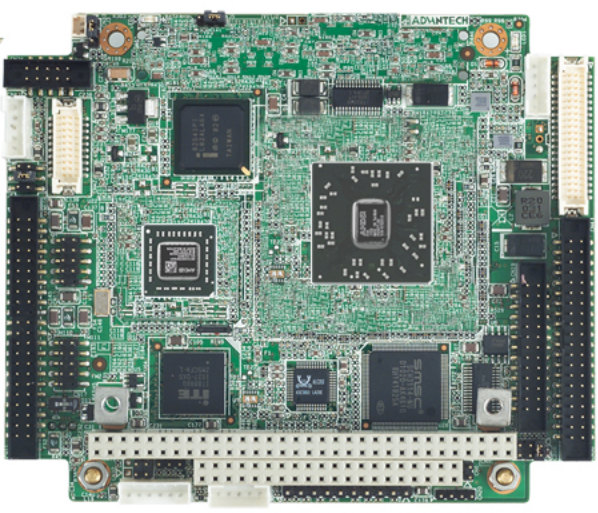
Advantech CPU Module Based on AMD G-T16R APU

This new AMD embedded processor targets industrial control, point-of-sale, medical appliance and transportation markets.  As with the other G-Series platforms, the G-T16R can fit into small form factor boards by implementing a two-chip platform: APU + controller hub.

AMD G-T16R is clocked at 615MHz, features a Radeon HD 6250 GPU and supports 1920×1200 resolution via VGA, single link DVI and DisplayPort 1.1a video outputs. It can also output 1080p via HDMI and LVDS.

The APU supports Windows Embedded Compact 7, Green Hills INTEGRITY and Express Logic ThreadX operating systems according to the press release. It also support Windows XP/7 and Linux since they measured the power consumption on “Inagua” development board running Windows 7 Ultimate and performance on IBASE MI958 board (with G-T16R APU) running Ubuntu 11.04.

AMD also introduced several customers boards and modules that are already designed around AMD G-T16R APU:

  • Advantech PCM-3356 PC/104 CPU module
  • Aewin PM-6161 PC/104 board
  • Arbor EmETX-a55E0 ETX CPU module
  • aValue ECM-A50M 3.5” embedded motherboard
  • Axiomtek CM100 COM Express module
  • MEN Mikro Elektronik SC24 computer-on-module.

In addition, AMD announced the availability extension of the entire AMD Embedded G-Series processor family through 2017 both existing and new designs.

You may be able to find further details on AMD G-Series APU page.

Digg This
Reddit This
Stumble Now!
Buzz This
Vote on DZone
Share on Facebook
Bookmark this on Delicious
Kick It on DotNetKicks.com
Shout it
Share on LinkedIn
Bookmark this on Technorati
Post on Twitter

Collabora and Fluendo Release GStreamer SDK 2012.5 Amazon

June 14th, 2012 No comments

Last week, Collabora and Fluendo jointly announced the release of an open source software development kit (SDK ) for GStreamer multimedia framework.

The SDK aims at easing the integration of Gstreamer  into projects and provides a pre-built version of the framework which is available for Linux, Windows and Mac OS X.

GStreamer is used in many Linux applications such as media players (Rhythmbox, Banshee and Amarok),  video editors (PitiVi), and media centers such as XBMC among other applications. It’s also often the framework used to play videos on ARM platforms with implementations for OMAP 4/5 and devices compliant with the OpenMAX standard.

Gstreamer website has also been updated and provides links to download GStreamer SDK and documentation on the home page.

The new documentation looks pretty good with fives main sections:

GStreamer developers also announced that future releases of the SDK will support Android, iOS and possibly other platforms.

Via: H-Online

Digg This
Reddit This
Stumble Now!
Buzz This
Vote on DZone
Share on Facebook
Bookmark this on Delicious
Kick It on DotNetKicks.com
Shout it
Share on LinkedIn
Bookmark this on Technorati
Post on Twitter

Leap Motion Lets You Control Your Computer With Finger Gestures

May 22nd, 2012 No comments

Leap Motion is a tiny USB device, about the size of a thumb drive, that let’s you control your computer with hands and fingers (and even pencils) gestures in three dimensions using motion sensing and motion control technology.

The company claims that Leap technology is 200 times more accurate than existing solutions with an accuracy up to 0.01 millimeter (which seems over the top). To use the LEAP, simply plug it into a USB port, install Leap Motion software, calibrate the device and you’re ready to control your PC a la minority report.

This technology will probably not displace the mouse and keyboard, as your arms would get very tired after a while, but there are some good use cases:

  • Stylus emulation and 3D images creation.
  • Gaming.
  • 3D modeling software interaction.
  • Sign a document digitally with a pen.
  • User interaction in Windows 7/8 or Mac OS X: Clicking, grabbing, scrolling, pinch to zoom, etc…
  • Surgeons can control 3D medical data with their hands without taking off their gloves

Thinking about it, I wonder if your hand could be used as a virtual mouse considering the accuracy. You would just move your hand as if you had a mouse and tap on the desk for left or right click.

You have to watch the video below to see how cool this device is. Tip: You can play Angry Birds with Chopsticks.

The Leap Motion currently supports Microsoft Windows 7 / 8 and Mac OS X only, but support for Linux will come later.

The device is not quite ready for retail just yet, and the Leap Motion team is looking for qualified developers in order to send them a free Leap device and the SDK. If you think you’ve got what it takes, you can register here. The development kits will be send to developers within one to three months.

The Leap Motion should be available in December 2012 or January 2013, but consumers can already pre-order the Leap Motion for 69.99 USD + shipping.

Via tuxplanet and korben

Digg This
Reddit This
Stumble Now!
Buzz This
Vote on DZone
Share on Facebook
Bookmark this on Delicious
Kick It on DotNetKicks.com
Shout it
Share on LinkedIn
Bookmark this on Technorati
Post on Twitter

VIA Technologies Announces VIA AMOS-3002 System For Embedded Applications

May 17th, 2012 No comments

VIA Technologies has just unveiled the VIA AMOS-3002, a fanless system based on VIA EPIA-P900 Pico-ITX board, targeting embedded applications such as telematics, in-vehicle control, machine to machine controller (M2M), digital signage and kiosks.

Embedded Systems based on VIA Eden X2 dual core processor and the VIA VX900H media system processor

VIA AMOS-3002 System (Click to Enlarge)

The VIA EPIA-P900 Pico-ITX board is powered by VIA Eden X2 dual core processor (1GHz) together with VIA VX900H media system processor (MSP) and VIA Chrome 9 video processor which render VIA AMOS-3002 systems capable of handling hardware video decoding for MPEG-2, WMV9 and H.264 codecs at 1080p resolution.

Two models are available: AMOS-3002-2D10A1 and AMOS-3002-2D10A1. The latter features a 2.5” SATA hard disk drive bay which is not available in AMOS-3002-2D101A1.

Here are the specifications for both VIA AMOS-3002 Models:

  • CPU – VIA Eden X2 @ 1.0GHz
  • Chipset – VIA VX900H Media System Processor
  • Memory – 1x DDR3 1066 204-pin SODIMM socket (Up to 4GB)
  • Storage:
    • 1x CFast Flash disk socket
    • 1 x 2.5” SATA hard disk drive bay (Model AMOS-3002-2D10A1 only)
  • Graphic Controller – Integrated VIA Chrome 9 HD DX9 3D/2D video processor with MPEG-2, DivX, WMV9/VC1, H.264 video decoding acceleration
  • Video Output:
    • 1x External VGA port (Up to 2560 x 1600)
    • 1x Onboard HDMI 1 port connector
    • Dual View support with independent display of VGA and HDMI
  • Ethernet – 2x Gigabit Ethernet
  • Audio I/O – 1x Line-out and 1x Mic-in
  • USB – 6x USB 2.0 ports
  • Serial Ports:
    • 1 x RS-232
    • 1x RS-232/422/485
  • GPIO – 1 x D-Sub 9-pin connector of 8-bit GPIO (4 inputs+ 4 outputs) + 5V power source
  • Expansion:
    • 1x MiniPCIe slot
    • 1x SIM slot
  • Watchdog timer
  • Power Supply – [email protected] A
  • Dimensions – 197mm (W) x 49mm (H) x 104mm (D)
  • Weight – 1.4 kg
  • Operating Temperature:
    • -10 °C up to 60°C
    • 0 °C ~ 45°C when system equipped with 2.5” hard disk drive
  • Certifications – IEC 60068-2-64, IEC 60068-2-27, CE, FCC Class A and CCC
VIA Eden X2 + VX900H Block Diagram

VIA EPIA-P900 Block Diagram (Click to Enlarge)

VIA AMOS-3002 systems support Microsoft Windows XP, Windows 7, Windows Embedded Standard, Windows Embedded
Compatibility Standard 7 and Linux operating systems.

You can find more information on VIA AMOS-3002 (Pico-ITX) page as well as EPIA-P900 page.

Digg This
Reddit This
Stumble Now!
Buzz This
Vote on DZone
Share on Facebook
Bookmark this on Delicious
Kick It on DotNetKicks.com
Shout it
Share on LinkedIn
Bookmark this on Technorati
Post on Twitter

Tizen 1.0 SDK and Source Code Release

May 1st, 2012 No comments

The Tizen Technical Steering Group has announced, today, the release of Tizen 1.0 “Larkspur”.

Tizen 1.0 release provides several new SDK features and improvements including:

  • Simulator: A new browser-based tool that supports the Tizen APIs and allows you to run and debug your web applications, and simulate running applications with various device profiles.
  • IDE: Enhancements include more flexibility around templates and debugging tools.
  • Emulator: Significantly improved emulator performance through Intel’s Hardware Acceleration Manager for Windows and OpenGL acceleration for Linux.
Tizen Web Based Simlautor

Tizen Simulator (Click to Enlarge)

Updates to the platform source code include:

  • Web: Support for additional features of W3C/HTML5 specification
  • Location: Support for POI (Point of Interest) and route search
  • Connectivity: Wi-Fi Direct key features added

You can see the full list of changes by reading the release notes for the SDK and the source code.

Tizen has also added a bug tracker and a wiki for the community and a few back-end changes have been made in order to improve stability and scalability of the infrastructure.

If you want to install the SDK, you’ll need a dual core 2 GHz CPU, with 2 GB of RAM running the 32-bit version of Ubuntu (10.04 or greater) or the 32-bit version of Windows XP SP3/Windows 7.  Tizen SDK makes use of Oracle Java v6 or higher version and several packages: qemu-kvm, binutils-multiarch, debhelper, fakeroot, realpath, gettext, procps, xsltproc, libdbus-1-3, liblua5.1-0, libexif12, and libcurl3.

You can download the SDK for your operating system below.

Operating System Download File Size Updated Date
Ubuntu 32-bit tizen_sdk.bin 4.5 MB April 30, 2012
Windows 32-bit tizen_sdk.exe 5.1 MB April 30, 2012

The installation is straightforward (especially in Windows), but if you run into problems, you can also check the instructions to install the SDK on Ubuntu or install the SDK on Windows.

If you have any feedback/comment or want to report bugs, you can do so on Tizen community page.

Digg This
Reddit This
Stumble Now!
Buzz This
Vote on DZone
Share on Facebook
Bookmark this on Delicious
Kick It on DotNetKicks.com
Shout it
Share on LinkedIn
Bookmark this on Technorati
Post on Twitter