The Embedded World Conference 2012 will taken place on the February 28 – March 1 in Nuremberg, Germany. There will be over 1,000 exhibitors for the tenth conference (it started in 2003) showcasing their new products and solutions for the embedded markets. Beyond the exhibition, there will also be 13 classes and 22 sessions during those 3 days. February 28th 2012 Classes: 09:30 – 15:30 – Modeling Behavior with UML: Interactions and Statecharts by Dr. Bruce Douglass, IBM 16:00 – 17:00 – Agile Systems Engineering by Dr. Bruce Douglass, IBM 09:30 – 18:00 – Introduction to Real-Time Operating Systems by Dr. David Kalinsky, D. Kalinsky Associates 09:30 – 18:00 – Hands-on-Workshop Safety Critical Linux – Automated debugging and code screening with formal methods by Prof. Nicholas Mc Guire, OSADL Safety Critical Linux Working Group and Andreas Platschek, OpenTech. 09:30 – 16:30 – Cryptography and embedded Security – The Workshop chaired […]
Using Your Android Smartphone As A Desktop Computer
I’ve already written some posts with videos showing the many things you could do with your smartphone thanks to MHL Technology. Christian Qantrell (YouTube User) uploaded a video on YouTube where he connected his smartphone to a monitor with a MHL cable showing how it could be used as a desktop computer. I really like his setup with a Samsung Galaxy Nexus (Android 4.0) smartphone connected to a monitor with an MHL adapter (Micro-USB to HDMI) and Apple Bluetooth keyboard and (Magic) trackpad. He also mentioned external power, but this should not be needed if his monitor supported MHL. The Apple trackpad makes it very neat as it tracks the finger movements as it would if you used the smartphone touchscreen. He showed web browsing and music playback and said gmail works great. Thanks to the multi-touch trackpad, pinch and zoom also works. Overall, the user experience feels pretty good. […]
Run Windows 7 (or Any OS) on Android Tablets with PCoIP Protocol
Teradici has developed PCoIP (PC-over-IP) protocol, a technology that allows to run a full desktop remotely over the network on thin clients, desktops, integrated displays, laptops and even Android tablets. The PCoIP protocol compresses, encrypts and encodes the entire computing experience at the data center and transmits it ‘pixels only’ across any standard IP network to stateless PCoIP zero clients. The PCoIP protocol is implemented in silicon for hardware accelerated performance and in software in VMware View. It supports high resolution, full frame rate 3D graphics and HD media, multiple large displays, full USB peripheral connectivity, and high definition audio all via LAN or WAN networks. A typical network made of PCoIP clients is shown below. Teradici emphasizes three key features of PCoIP technology: PCoIP technology uses host rendering Most other remote desktop technologies uses client rendering which may not be optimal and requires somewhat powerful clients. PCoIP uses host […]
The Past, Present and Future of Ubuntu for ARM

David Mandala of Canonical talked at Linux.Conf.Au on 18th of January 2012 about Ubuntu for ARM and the move from netbook to server support. You can read my notes below, or jump at the end of this post to watch the presentation. The Past 2008: Ubuntu decides to only support ARMv7 architecture vs. Debian that supports ARMv4 and above. 2009: Ubuntu release for Freescale i.MX51 (ARMv5 built), and then Marvell ARMAVA with ARMv6 and VFP (ARM floating point unit) support. 2010: April (10.04) The first ARMv7 release for OMAP3 (Beagleboard) with VFP, Thunb2, NEON and SMP for ARM and first netbook edition October (10.10) Pandabord (OMAP4) release with initial device tree support for ARM. Starts work with Linaro. 2011: 11.04 (5th release) – Supports OMAP3 and OMAP4 only. The netbook edition is using Qt, further improvement to device tree, further work with linaro and on the way to the Unified […]
Resize a VirtualBox VDI Image in Windows XP/7
I had a VDI image set to 8GB that was nearly full and re-sized it to 16 GB with the following command: “C:\Program Files\Oracle\VirtualBox\VBoxManage.exe” modifyhd “C:\Documents and Settings\Jean-Luc\VirtualBox VMs\Debian 6.0.3\Debian 6.0.3.vdi” –resize 16384 16384 is the new virtual harddisk size in MB (16 GB). This will increase the size of the Virtual disk. However, it won’t increase the size of the partition in your virtual disk. You have then 2 solutions: Create a new partition with the extra free space Use Gparted Live ISO image to increase the size of your current partition. Jean-Luc Aufranc (CNXSoft)Jean-Luc started CNX Software in 2010 as a part-time endeavor, before quitting his job as a software engineering manager, and starting to write daily news, and reviews full time later in 2011. www.cnx-software.com
Copy/Paste Text between Windows XP Host and Ubuntu Guest in VirtualBox
I’ve recently upgraded the amount of memory and graphics card in my computer to order to be able to smoothly run virtual machines and support 2 monitors. So instead of using dual boot for Windows XP and Ubuntu, I’m now running Ubuntu in VirtualBox. One thing, I wanted to do is to copy text from the right screen (e.g. Instructions in Web Browser in Windows XP) to the left screen where I have Ubuntu 11.10 running in VirtualBox. This does not work right out of the (virtual)box however. The procedure to enable “Shared Clipboard” is straightforward. First, you need to install the guest additions. While Ubuntu is running, click on “Devices->Install Guest Additions” in VirtualBox top menu, this will start the installation in Ubuntu, simply enter you root password until the installation completes. Restart Ubuntu and you should now be able to copy/paste text between the host and guest machines. […]
Technologies and Techniques to Accelerate Embedded Development
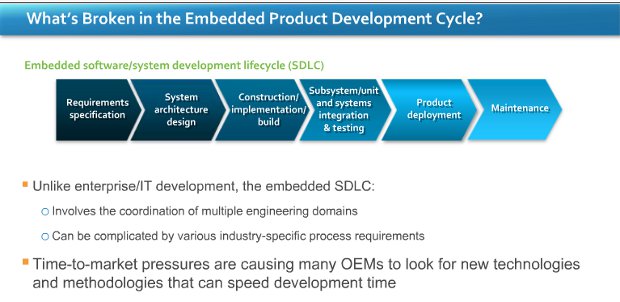
I’ve recently attended a webinar entitled “Accelerate Your Next Embedded Development Project: Essential Tools and Techniques for Every Phase of Your Project Lifecycle” presented by Wind river and VDC Research. The two speakers were: Marc Brown, Wind River VP, Tools and Marketing Operation. Christopher Rommel, Senior Analyst at VDC Research. The webinar was composed of three sections: Industry Challenges. (Wind River) Embedded Development: Data and Trends. (VDC Research) New ways to accelerate development (Wind River) Industry challenges Marc describes the new challenges for device software drivers: Increased security, safety and quality requirements for connectivity Performance scalability: multi-cores, many cores and SoC support. Pressure to lower OPEX (Operating Expenses) Companies are now pushed to increase performance, become more cost effective and provide a better connectivity while at the same time decrease time to market, project risks and security issues. Data and Trends Christopher first present a slide showing there are still […]
Run 2 OS Simultaneously on ARM (OMAP4) with Codezero Embedded Hypervisor
B Labs, a company specializing in ARM Virtualization, was at ARM Techcon 2011 showcasing Codezero, their Embedded Hypervisor to run multiple Linux OS such as Android and Chrome OS on ARM processors. The main purpose of running 2 operating systems is to separate home and enterprise operating systems in mobile devices so that enterprise data is safe. Charbax (ARMDevices.net) interviewed Bahadir Baldan, founder of B Labs, and showed a demo running 2 Android instances and another running Android and Linux in pandaboard. The overhead is 10 to 15% according to B Labs, so the performance hit is minimal. They have already managed to run 4 OS on quad core processors with good performance. They are not able to run Windows operating systems (e.g. Windows Mobile 7.5/ Windows 8) yet, because Cortex A9 processors lack virtualization extensions. This will however be feasible with Cortex A15 processors as binary virtualization will be available. […]