Archive

Posts Tagged ‘freescale’

Thingsquare Mist – Open Source Firmware for The Internet of Things

March 20th, 2013 No comments

Thingsquare recently released the source code for the Thingsquare Mist firmware, an ultra lightweight router software (<4 kB memory) for the Internet of Things based on open Internet standards such as IPv6, RPL (Routing Protocol for Lossy networks), and 6lowpan. Thingsquare Mist allows to connect battery-powered wireless micro-controllers to the Internet, and is currently used in applications such as smart light bulbs, connected home appliances, and connected cities.

Thingsquare Mist Architecture

Thingsquare Mist Architecture

The IPv6 mesh network is composted of nodes with a low power radio that communicate with the Mist router (Green), which in turn connect to the Internet and Thingsquare Cloud backend (Thingsquare Haven) to store the data, and/or receive control commands via Ethernet or Wi-Fi. The end users can then use an App to monitor, and/or control the devices remotely. Thingsquare Mist uses IETF RPL IPv6 mesh routing protocol (pronounced “ripple”) for IPv6 nodes communications.

red-io

Red-IO

Thingsquare Mist runs on several low-power wireless SoCs, standalone MCUs, as well as low-power wireless transceiver combos, and both 2.4 GHz and sub-GHz radios are supported:

  • 2.4 GHz radio:
    • mist-cc2538dk based on TI CC2538 ARM Cortex M3 SoC
    • red-io based on Freescale MC13224v ARM7 SoC
  • sub-GHz radio:
    • stm32l-spirit1 powered by STMicro STM32L ARM Cortex M3 MCU + SPIRIT1 radio
    • exp1120 powered by Texas Instruments MSP430f5438 MCU + CC1120 radio
    • exp1101 powered by Texas Instruments MSP430f5438 MCU + CC1101

Thingsquare Mist can run on hardware with 64 to 256 kB flash and 16 ti 32 kB RAM. The graph below shows the flash and RAM footprint (in kB) for a router configuration for both 16- and 32-bit micro-controllers. The device configuration (not shown) also runs a WebSocket client, but does without the firewall, and has a very similar footprint to the server. The operating system of the platform is Contiki, an open source OS for the Internet of Things.

Mist Router Footprint on 16-bit and 32-bit Processors

Mist Router Footprint on 16-bit and 32-bit Processors

Thingsquare Mist 1.0.1 is a 33 MB download which contains the following directories:

  • app – Thingsquare Mist applications
  • contiki – The Contiki OS
  • dev – Device drivers for radios
  • examples – Examples such as hello world, mesh node, router node, and udp multicast.
  • platform – Code for the hardware platforms mentioned above.
  • tools – Various tools

Software for Thingsquare Mist is developed in C language and can be compiled with either gcc or IAR. The company recommends to use the open source Instant Contiki development environment (Eclipse based). It a 2GB single-file download that includes an Ubuntu virtual machine to be run in VMWare Player pre-installed with the  required compiler and toolchain. You can also use Thingsquare Mist simulation environment in order to test your code before production and deployment. I could not find a download link for the latter though…

For further information, you can visit Mist page on Thingsquare.com.

Via Guillaume.

Digg This
Reddit This
Stumble Now!
Buzz This
Vote on DZone
Share on Facebook
Bookmark this on Delicious
Kick It on DotNetKicks.com
Shout it
Share on LinkedIn
Bookmark this on Technorati
Post on Twitter

Freescale Unveils Kinetis KL02, an Ultra Small (1.9×2.0mm) ARM Cortex M0+ Microcontroller

February 27th, 2013 No comments

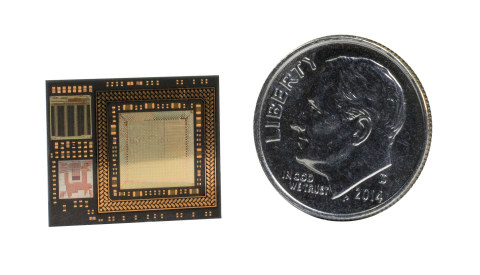
Freescale Semiconductor introduced the Kinetis KL02, the world’s smallest ARM MCU, at Embedded World 2013. KL02 is an ARM Cortex M0+ micro-controller designed to address the miniaturization needs of the Internet of things, and its size (1.9×2.0mm) makes it suitable for applications such as ingestible healthcare sensing, portable consumer devices, remote sensing nodes, and wearable devices.

 Freescale_Kinetis_KL02

Kinetis KL02 MCU features include:

  • 48 MHz ARM Cortex-M0+ core, 1.71-3.6V operation
  • Bit manipulation engine for faster, more code-efficient handling of peripheral registers
  • 32 KB flash memory, 4 KB RAM
  • High-speed 12-bit analog-to-digital converter
  • High-speed analog comparator
  • Low-power UART, SPI, 2x IICI2C
  • Powerful timers for a broad range of applications including motor control
  • Power Efficiency – 15.9 CM/mA (Coremark 1.0)
  • -40 °C to +85 °C operation
Kinetis KL02 MCU Family Block Diagram

Kinetis KL02 MCU Family Block Diagram

The MCU is manufactured using chip-scale package (CSP) technology that allows to connect the die directly to the solder ball interconnects and, in turn, to the printed circuit board (PCB). Freescale explains “this removes the need for bond wires or interposer connections, which minimizes die-to-PCB inductance and improves thermal conduction and package durability for physically harsh environments.”

Freescale Freedom Board FRDM-KL05Z

Freescale FDRM-KL05Z

Freescale Freedom development platform (FRDM-KL02) and related tools should be available in July 2013, but in the meantime, Freescale suggests customers to start development with FRDM-KL05Z Freescale Freedom development platform which will be available in March/April.

Kinetis KL02 CSP MCU should start sampling to key customers in March 2013, which broad market availability planned for July 2013. Unit price should be around $0.75 cents in 100,000-unit quantities.

To learn more, visit freescale.com/Kinetis/KL02CSP, or alternatively, if you are currently at Embedded World in Nuremberg, Germany, you can visit Freescale booth (Hall 4A, Booth 206).

Digg This
Reddit This
Stumble Now!
Buzz This
Vote on DZone
Share on Facebook
Bookmark this on Delicious
Kick It on DotNetKicks.com
Shout it
Share on LinkedIn
Bookmark this on Technorati
Post on Twitter

mbed 2.0 SDK Released, becomes Open Source and Supports $12.95 Freescale Freedom Board

February 27th, 2013 No comments

The mbed community has had a pretty busy week, with first the announcement that mbed SDK would become open source, the release of mbed 2.0, and finally support for the low cost Freescale Freedom board FRDM-KL25Zpowered by Kinetis Cortex M0+ KL25Z MCU.

mbed becomes open source

The mbed Software Development Kit (SDK), a C/C++ MCU software platform, has always been free (as in free beer) for both commercial and noncommercial use, and the large community around mbed has written tons of code for ARM microcontrollers. But now that the SDK has now a stable API, and the developers achieved transparent portability for code based on the SDK across multiple controllers and multiple toolchains, they decided to release the SDK source under an Apache 2.0 license. Although sharing modifications is encouraged, this license allows users to keep the changes closed if they wish to do so.

mbed developers explain that the 3 most important aspect of the source code release are as follows:

  • Developers working on commercial products will not have to worry of any lock-in and they will be able to modify trade-offs unsuitable for their embedded system
  • Open source projects based on the mbed platform will be able to provide a completely open software stack
  • Those looking to learn or contribute will now be able to delve in to the depth of the lowest level implementations

Visit mbed SDK to learn more about the SDK, its API, supported toolchains and targets, and/or get the code directly on github.

mbed 2.0 Release

The mbed platform, developed by ARM, partners such as NXP and Freescale, and the mbed developer community, has reached milestone 2.0 with the following highlights:

  • Open Source SDK
  • Development Board HDK – The new mbed Hardware Development Kit (HDK) delivers microcontroller sub-system reference designs that can be used as the basis for new hardware boards and products. HDK designs specify all major support components including an on-board USB interface. The design is already used in the official mbed Microcontroller prototyping modules, and work is being done on other  low-cost evaluation boards.
  • Free Online Tools – The mbed Compiler provides a free online IDE powered by ARM professional C/C++ compiler, pre-configured and tested to generate fast, efficient code. Other features include distributed version control, project exports to use with other toolchains, USB CMSIS-SAP debug interface, and more.  You can access it via mbed.org developer site.
  • Developer Community – The large community provides efficient support, and access to lots of existing source code and projects. The integration of distributed version control with the online compiler and developer website makes publishing and accepting code simple, allowing developers to easily collaborate on hard problems, and provides opportunities to request or accept contract work to help get things built.

mbed has uploaded a new video giving an overview of mbed. It’s probably only interesting if you’ve never used mbed before.

To get started easily you’ll need one of the mbed NXP (or now Freescale) prototyping boards, and read the instructions on Explore mbed page.

mbed on Freescale Freedom Board (aka FRDM-KL25Z Board)

Freescale FRDM-KL25Z features Freescale KL25Z 32-bit ARM Cortex-M0+ core @ 48MHz, and comes with 128KB FLASH, 16KB RAM and many interfaces such as USB Host & Device, SPI, I2C, ADC, DAC, PWM, Touch Sensor and more.

Freescale Freedom Platform FRDM KL25Z

The Freedom board comes with the following features:

  • Freescale KL25Z MCU
    • High performance ARM Cortex-M0+ Core
    • 48MHz, 16KB RAM, 128KB FLASH
    • 2xSPI, 2xI2C, 3xUART, 6xPWM, 6xADC, Touch Sensor, GPIO
  • FRDM-KL25Z Onboard peripherals
    • MMA8451Q – 3-axis accelerometer
    • PWM Controlled RGB LED
    • Capacitive touch sensor
  • Evaluation Form factor
    • 81mm x 53mm
    • 5V USB or 4.5-9V supply
    • Built-in USB drag ‘n’ drop FLASH programmer

At $12.95 it’s much cheaper than NXP LPC Cortex M0 mbed boards that start at $49, but it’s must probably not as well supported by the community just yet.

If you already own a Freedom board, you can get started immediately by following the instructions on mbed.org.

Digg This
Reddit This
Stumble Now!
Buzz This
Vote on DZone
Share on Facebook
Bookmark this on Delicious
Kick It on DotNetKicks.com
Shout it
Share on LinkedIn
Bookmark this on Technorati
Post on Twitter

Developer Community for Freescale i.MX6 HDMI Dongles

February 13th, 2013 19 comments

Last week, I explained how to build U-boot, the kernel, and Android for Freescale i.MX6 HDMI dongle reference platform. Since them, there has been a bit more activity, with Richtechie releasing source code to some ARMTvTech members. However, this source code is very similar to the one released by Freescale, and misses some part present in the kernel config on GK802 such as CONFIG_MACH_MX6Q_RICHTECHIE, and the company clearly does not comply with the GPL. Let’s forget that for now, as Jasbir (who is also behind the Hackberry board) has managed to build and boot the kernel on his mini PC. There’s still more work to do, but at least we have a based to work on. In the meantime, I’ve noticed rz2k, an other developer, was also giving it a try on #arm-netbook Freenode IRC channel, so we decided to setup a few things to facilitate development and communication between developers.

There are now 2 repositories on gihub rz2k account for HI802/GK802 software development:

Assuming, you’ve already installed Linaro toolchain in Ubuntu or another Linux distribution, here’s how to get and build the Linux kernel:

git clone git://github.com/rzk/linux-imx.git
cd linux-imx
git checkout imx-android-r13.4-ga-hdmidongle
make imx6_android_defconfig CROSS_COMPILE=arm-linux-gnueabihf- ARCH=arm
make -j8 CROSS_COMPILE=arm-linux-gnueabihf- ARCH=arm

and U-boot:

git clone git://github.com/rzk/uboot-imx.git
cd uboot-imx
git checkout imx-android-r13.4-ga-hdmidongle
make mx6q_hdmidongle_android_config CROSS_COMPILE=arm-linux-gnueabihf- ARCH=arm
make -j8 CROSS_COMPILE=arm-linux-gnueabihf- ARCH=arm

For both repositories, the git checkout part is not really needed since imx-android-r13.4-ga-hdmidongle is the default branch, and there’s no default config for Hi802/GK802 yet, so “imx6_android_defconfig” and “mx6q_hdmidongle_android_config” are just taken as examples, but this should change soon.

We’ve also setup two communication channels for developers, and anybody is welcomed to join:

Freescale i.MX6 platform holds a lot of promise with GPU and VPU support in Linux, and hopefully, there will be enough traction in the community to make it a great Linux platform.

Digg This
Reddit This
Stumble Now!
Buzz This
Vote on DZone
Share on Facebook
Bookmark this on Delicious
Kick It on DotNetKicks.com
Shout it
Share on LinkedIn
Bookmark this on Technorati
Post on Twitter

Modular Graphics on Embedded ARM – ELCE 2012

January 15th, 2013 No comments

Philipp Zabel, kernel developer at Pengutronix, discusses about graphics and video support for Linux on embedded SoCs at Embedded Linux Conference Europe 2012.

Abstract:

Porting Linux to new ARM based application processors has recently become easier than ever: the kernel gained many new frameworks like common-clock, oftree and pinmux. However, things get complicated when it comes to high end embedded graphics units.Those graphics systems tend to be composed of a multitude of on-SoC functional blocks that can operate on shared graphics buffers and video signals, as well as off-SoC encoder/converter chips that can be mixed and matched with any SoC.The old framebuffer is certainly not enough for today’s hardware any more, while modern frameworks like KMS and DRM have their own hassles on non-PC style graphics systems.The talk outlines issues we found while working on graphics and video support for the MX53 and MX6 CPUs and gives suggestions for possible future improvements.This presentation is aimed at developers interested in the linux graphics stack.

You can also download the slides for this presentation. Pengutronix modular graphics driver (imx-drm) for Freescale i.MX5/6 SoC can be retrieved on their git repository.

Digg This
Reddit This
Stumble Now!
Buzz This
Vote on DZone
Share on Facebook
Bookmark this on Delicious
Kick It on DotNetKicks.com
Shout it
Share on LinkedIn
Bookmark this on Technorati
Post on Twitter

Embedded Linux Boot Time Optimizations – ELCE 2012

January 15th, 2013 No comments

Alexandre Belloni, embedded Linux engineer and trainer at Adeneo Embedded, gives a presentation about different techniques to optimize boot time for Embedded Linux at ELCE 2012. He also explains how they’ve measured the boot time.

Abstract:

A common problem faced when embedding Linux is the long boot time before the system is functional. There are many ways to improve boot up time. For a particular project, we had to answer a CAN message from Linux userspace in less than 420 ms from going out of CPU reset. We will describe our methodology and the techniques we finally chose to implement in that particular use case. We will also detail how we measured the boot time efficiently. A live demo will show the results of our work.

More specifically, Alexandre discusses two projects at Adeneo where boot time was critical:

  • An automotive platform based on Freescale i.mx53 needs to reply to a CAN message in less than 500ms
  • An OpenGL application must boot as fast as possible on a platform powered by Freescale i.mx6 Quad. After optimization, the app starts within 590ms from reset, 720ms from power on, instead of the 15 to 53!? seconds in the initial rootfs. See video demo.

He describes the different techniques tried to optimize the bootloader, kernel and rootfs, and provides the techniques they finally used in the final solutions.

You can also download the slides for this presentation. Adeneo released the bootloader source code (they completely got rid of U-boot), and you can find most of the techniques used on the Boot Time page from elinux.org.

Digg This
Reddit This
Stumble Now!
Buzz This
Vote on DZone
Share on Facebook
Bookmark this on Delicious
Kick It on DotNetKicks.com
Shout it
Share on LinkedIn
Bookmark this on Technorati
Post on Twitter

Crystalfontz CFA-10036 ARM9 Embedded Module Running Linux 3.7

January 11th, 2013 1 comment

Crystalfontz America, a supplier of LCD and OLED display modules used in embedded systems, has launched a Kickstarter campaign to fund manufacturing and lower the cost of a system-on-module powered by Freescale i.MX28 featuring a small 128×32 OLED display, and lots of GPIOs.

CFA-10036 SoMHere are the specs of CFA-10036 SoM:

  • Processor – Freescale i.MX283 @ 454MHz  (Optionally i.MX287)
  • System Memory – 128 MB DDR2 (Optionally 256MB)
  • Storage – microSD socket (Up to 64GB)
  • Interfaces:
    • 2x CAN interfaces
    • 4x synchronous serial ports
    • 10/100-Mbps 802.3 Ethernet MAC
    • USB 2.0 OTG (connected to microUSB AB on CFA-10036. Used for development purpose)
    • USB 2.0 host controller and PHY
    • 5x UART plus one dedicated debug UART
    • 2x I2C (OLED shares one of these)
    • LCD, touch screen, keypad, and rotary encoder support
    • RTC with 32KHz crystal (requires continuous power)
    • 4x 32-bit timers
    • 8x PWM
    • 5x 12-bit 428KS/s ADC channels
    • 1x 12 bit 2MS/s ADC channel
    • 91 GPIO (i.MX283) or 126 GPIO (i.MX287)
  • 6-layer impedance-controlled PCB, gold SODIMM contacts
  • Power Supply -  +5v (3.3v/1.8v/1.5v supplies internally generated)

The company will also provide CFA-10037, a baseboard for CFA-10036 module, in order to ease prototyping.

CFA-10036 module Connected to CFA-10037 Motherboard

CFA-10036 module Connected to CFA-10037 Motherboard

CFA-10037 board gives access to all the port pins of the CFA-10036 / Freescale i.MX28, and features Ethernet PHY and USB A connector, as well as a large prototype area which also includes a set of holes that line up with shields designed for an Arduino Uno R3. JTAG signals are also exposed for hardware-level debugging. Terminal access can be achieved via the microUSB port or a TTL to USB board connected to the Debug UART pins of CFA-10036 or CFA-10037.

Freescale usually releases the full source code and provides great documentation for their processors. However I’ve heard several developers complain how the lack of mainstream support, and you always end-up with somewhat outdated kernels. This is exactly the case for i.MX28, as Freescale i.MX28 Linux port is still based on Linux kernel 2.6.x. This is why Crystalfontz has decided to ask Free-Electrons to create a device tree for the CFA-10036 under the current mainline kernel version 3.7.

The platform will be mostly open as they will release the full schematic (PDF, PADS) and layout (gerbers, PADs) of the CFA-10037 baseboard, and release the schematic in PDF format for CFA-10036 as well as documentation of all the pin functions. It’s not fully open source hardware a la Olimex, but should be good enough for most projects. Buildroot and the kernel are available on Crystalfontx GitHub account.

You can watch the Kickstarter video for an introduction to the board, and see what people may do with it.

If you are interested in the project, you can pledge between $45 to $210 to get different combinations of module + baseboards. There are mainly four choices:

  • Reward A ($45 to $60) – CFA-10036 (i.MX283/128MB) + uSD card (4GB? TBC) + USB cable
  • Reward B ($95) – CFA-10036 (i.MX283/128MB) + CFA-10037 + uSD card + USB cable + 5V power supply
  • Reward C ($115) – CFA-10036 (i.MX287 /256MB) + CFA-10037 + uSD card + USB cable + 5V power supply + USB Wi-Fi module + TTL to USB board + USB cable for DUART + wires and headers for prototyping
  • Reward D ($210) – Reward A + Reward C

Prices do not include international shipping. If you want the board(s) to be shipped outside of the US, you have to pledge $1, then give your address before knowing the shipping charge, which is quite an unusual way to handle international shipping on Kickstarter.

Digg This
Reddit This
Stumble Now!
Buzz This
Vote on DZone
Share on Facebook
Bookmark this on Delicious
Kick It on DotNetKicks.com
Shout it
Share on LinkedIn
Bookmark this on Technorati
Post on Twitter